
Streamlining Chat Organization: Introducing Automated Archiving for Inactive Group Chats in WhatsApp
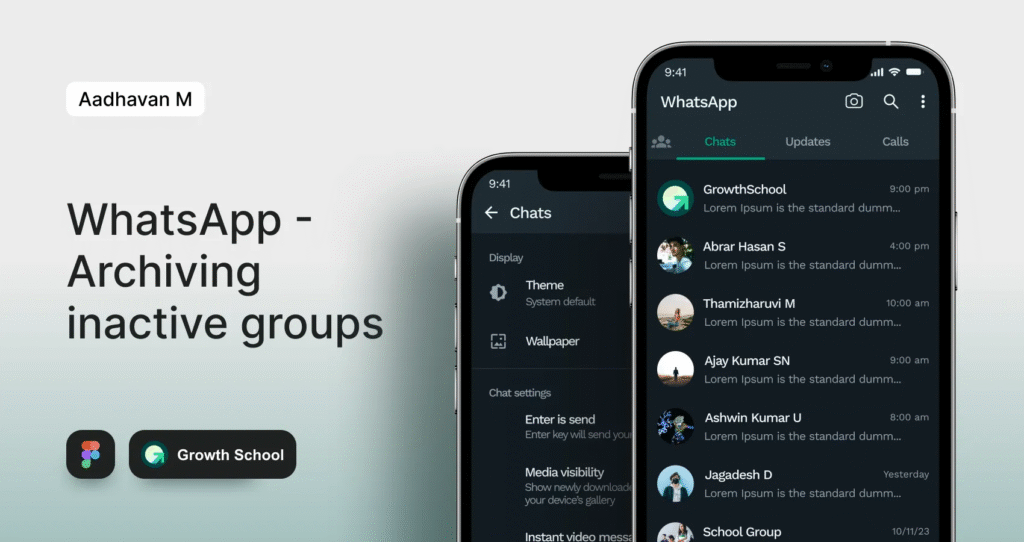
Project Summary :
My final Redesign of WhatsApp’s Archived chat Experience :
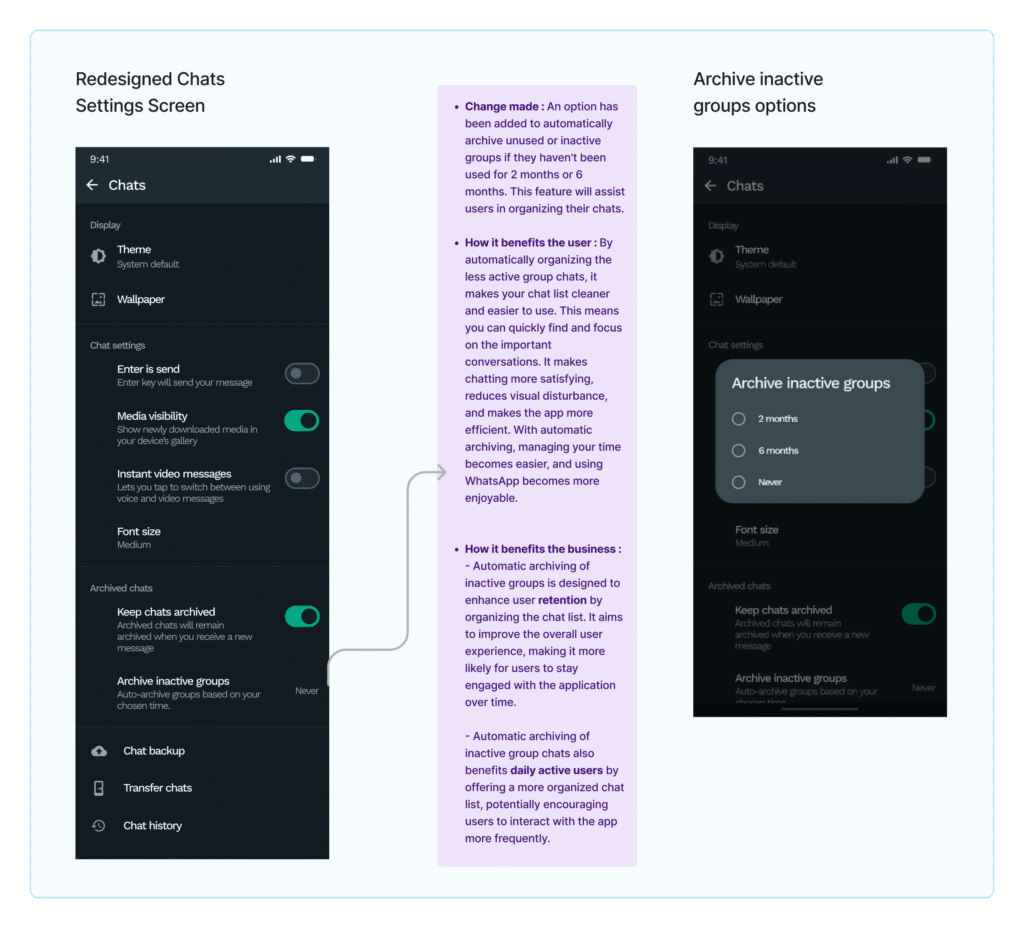
Here is the comparison of the original screen and the Redesign. I will be talking about how I got to the solution in the later part of the article.
What is the problem?
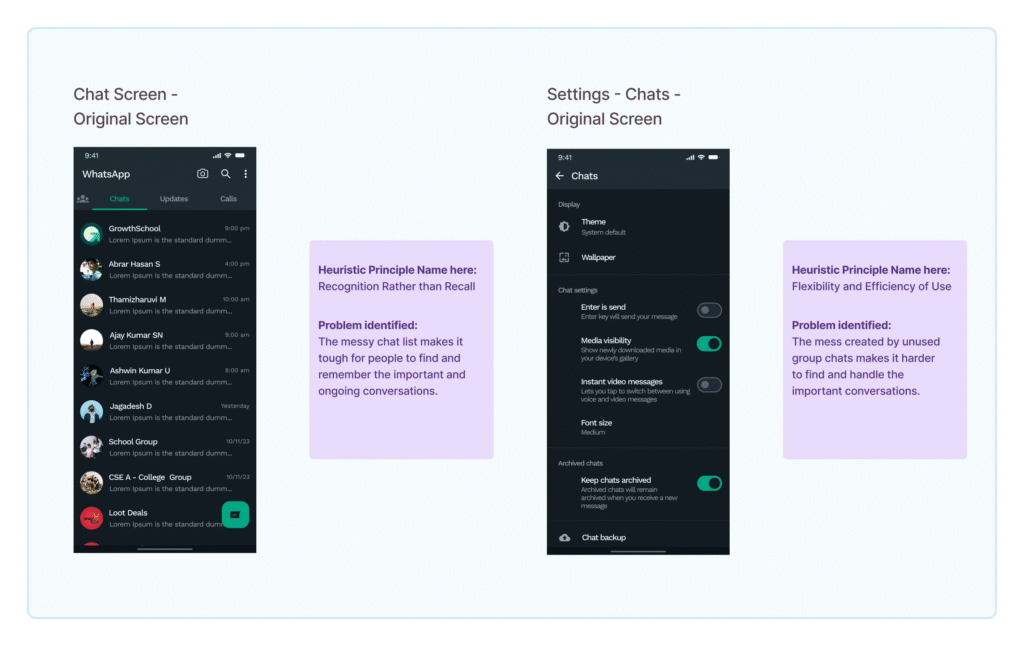
Users struggle with numerous unorganized, inactive group chats in WhatsApp, complicating the location of relevant and active conversations due to their dormant status or lack of current purpose.
For many small business owners, managing expenses can feel like a full-time job. Hours are spent organizing receipts, entering data into spreadsheets, and trying to stay on top of finances — time that could be used to grow their businesses. This manual process not only eats up valuable time but also increases the risk of errors, missed entries, and financial disorganization.
To tackle this, I designed Expenzo, a tool to take the stress out of expense management and make it as seamless as possible.
What is the solution and how does it help the user?
What Business Metrics does it affect?
The journey toward the ultimate solution unfolded as follows:
1. Learning from Existing Design :
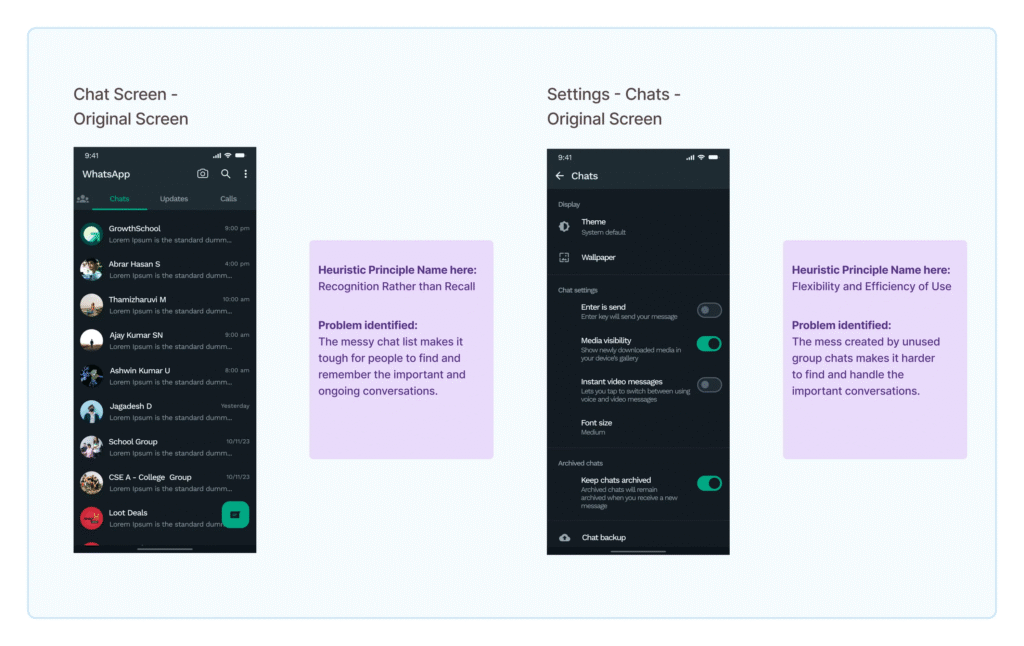
While engaging in the exercises outlined in the “Learning From Existing Design” workbook, I examined different apps, aiming to comprehend their respective designs. Referencing the workbook, I addressed the WhatsApp application, known for its extensive user base. Recognizing the problem of unorganized chat lists due to inactive groups or chats, I adopted this as my problem statement and commenced my work.

2. Business Impact of UX Design :
While engaging in the exercises outlined in the “Learning From Existing Design” workbook, I examined different apps, aiming to comprehend their respective designs. Referencing the workbook, I addressed the WhatsApp application, known for its extensive user base. Recognizing the problem of unorganized chat lists due to inactive groups or chats, I adopted this as my problem statement and commenced my work.
3. User-Centric Design :
The User-Centric Design workbook helps in understanding Jakob’s 10 Usability Heuristic laws, which serve as thumb rules to be followed. I implemented “Recognition rather than recall” and “Flexibility and efficiency of use” because users may struggle to recognize previous chats and organize the chat list. These heuristics were chosen to address these usability issues.
4. Generating ideas to address the identified problems :
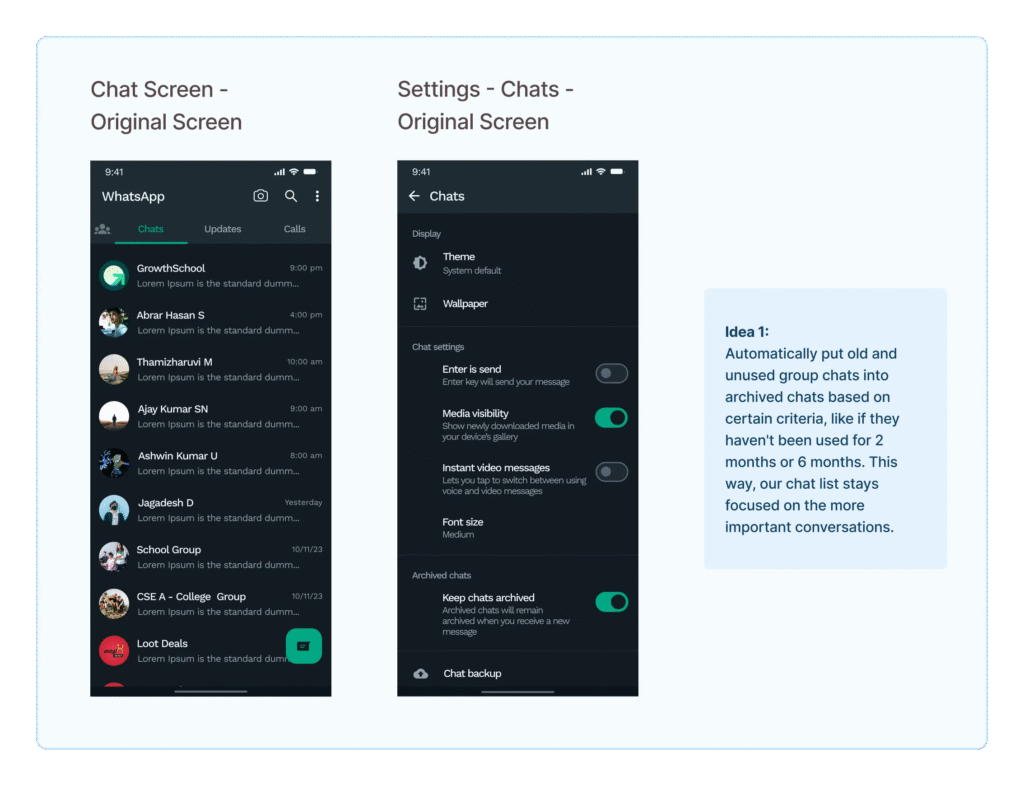
For the previously defined problem, I devised the idea of automatically moving old and unused group chats into archived chats based on specific criteria, such as if they haven’t been used for 2 or 6 months. This approach ensures that our chat list remains focused on more important conversations.
5. The process of transforming my idea into a low-fidelity prototype :
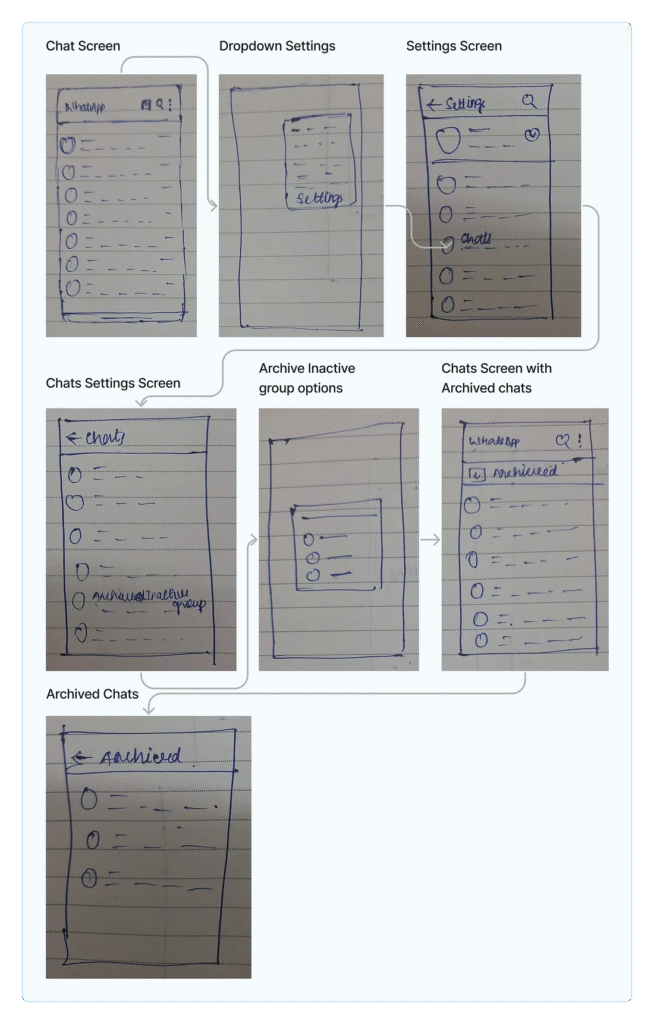
Creating a prototype in the Marvel app became even more thrilling. Applying insights from the “Low-Fidelity Prototype” Workbook, I generated links and interconnected screens. Witnessing my app in action, navigating seamlessly between categories, and easily returning using the prototype felt surreal.
6. Prototype to a High-fidelity version for a realistic app interface :
Drawing from Anudeep’s insights on UI elements and the “High-fidelity prototyping” workbook, I seamlessly crafted navigation with smart animations. The redesign focused on essential elements like the back button, profile image, delete option, and search clearance, aiming to elevate the design for a realistic app interface. The result ensures alignment with the current layout.
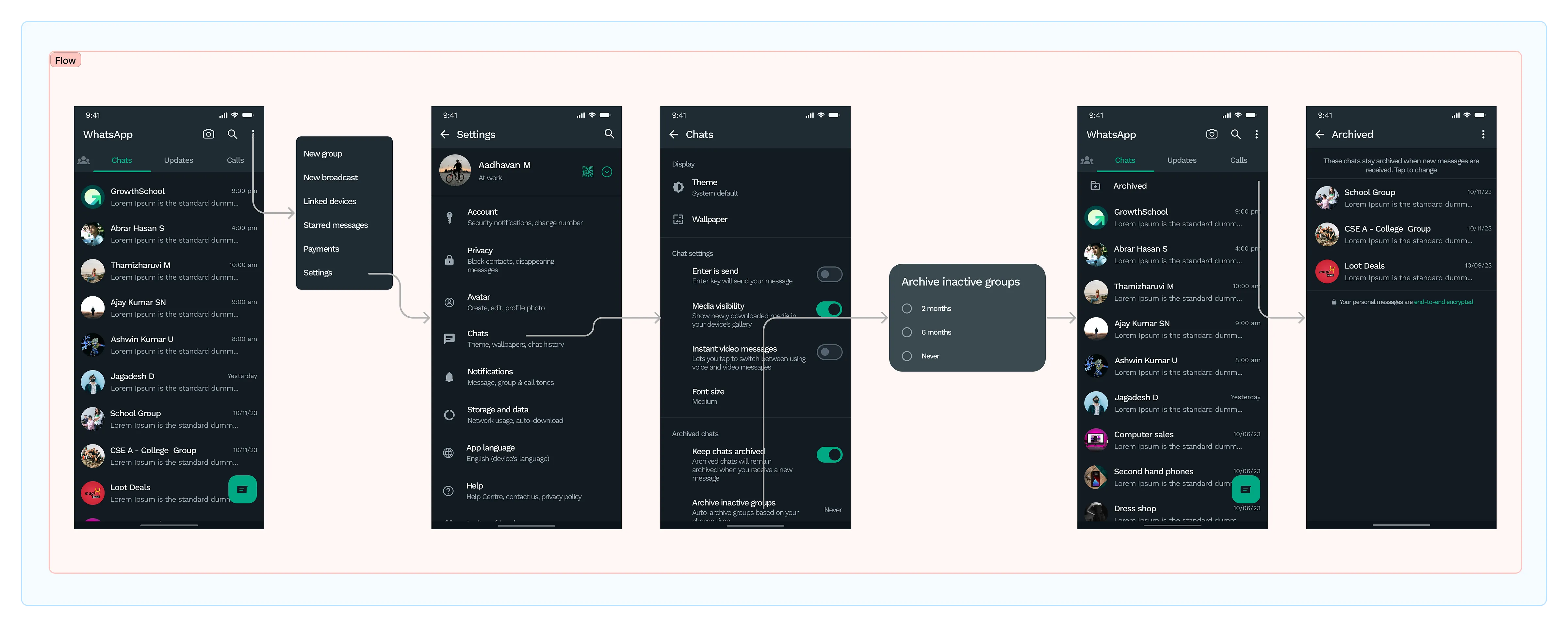
Following that, on the chat settings screen, I introduced a feature titled “Archive inactive groups.” By clicking on it, users are presented with three options: 2 months, 6 months, and never. These periods determine when inactive groups or chats, unused for 2 or 6 months, will be automatically moved to the archive upon selection. This functionality assists users in archiving unused and inactive chats, promoting an organized chat environment, and enhancing the overall user experience.
7. Validating the effectiveness of my solutions through usability testing :
Having finished designing based on the problems identified in the heuristic evaluation, I’ll now conduct user testing to ensure the designs are effective, addressing any issues and enhancing elements that may need improvement.
During usability testing, I engaged with users, assigning tasks to assess the clarity and usability of my design. The objective was to understand if users found the design comprehensible and if they could successfully navigate and utilize the features.
Tasks given to the user :
Observation :
Feedback from User :
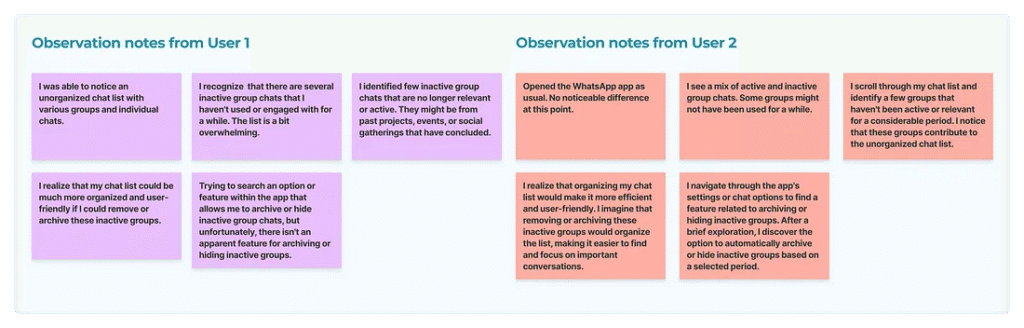
8. Enhancing redesigned screens using usability testing insights :
In usability testing, users can archive unused or inactive chats based on the selected period. However, a user raised a question: ‘What if a user already has some archived chats? Will these automatically inactive chats also be archived?’ In response to this feedback, I created additional flows to address this scenario.
Key Learnings :
Thank you so much for your time and thoughts! If you liked the project or have suggestions, connect with me via DM on social media ❤ — LinkedIn
Streamlining Chat Organization: Introducing Automated Archiving for Inactive Group Chats in WhatsApp
Project Summary :
My final Redesign of WhatsApp’s Archived chat Experience :
Here is the comparison of the original screen and the Redesign. I will be talking about how I got to the solution in the later part of the article.
What is the problem?
Users struggle with numerous unorganized, inactive group chats in WhatsApp, complicating the location of relevant and active conversations due to their dormant status or lack of current purpose.
For many small business owners, managing expenses can feel like a full-time job. Hours are spent organizing receipts, entering data into spreadsheets, and trying to stay on top of finances — time that could be used to grow their businesses. This manual process not only eats up valuable time but also increases the risk of errors, missed entries, and financial disorganization.
To tackle this, I designed Expenzo, a tool to take the stress out of expense management and make it as seamless as possible.
What is the solution and how does it help the user?
What Business Metrics does it affect?
The journey toward the ultimate solution unfolded as follows:
1. Learning from Existing Design :
While engaging in the exercises outlined in the “Learning From Existing Design” workbook, I examined different apps, aiming to comprehend their respective designs. Referencing the workbook, I addressed the WhatsApp application, known for its extensive user base. Recognizing the problem of unorganized chat lists due to inactive groups or chats, I adopted this as my problem statement and commenced my work.
2. Business Impact of UX Design :
While engaging in the exercises outlined in the “Learning From Existing Design” workbook, I examined different apps, aiming to comprehend their respective designs. Referencing the workbook, I addressed the WhatsApp application, known for its extensive user base. Recognizing the problem of unorganized chat lists due to inactive groups or chats, I adopted this as my problem statement and commenced my work.
3. User-Centric Design :
The User-Centric Design workbook helps in understanding Jakob’s 10 Usability Heuristic laws, which serve as thumb rules to be followed. I implemented “Recognition rather than recall” and “Flexibility and efficiency of use” because users may struggle to recognize previous chats and organize the chat list. These heuristics were chosen to address these usability issues.
4. Generating ideas to address the identified problems :
For the previously defined problem, I devised the idea of automatically moving old and unused group chats into archived chats based on specific criteria, such as if they haven’t been used for 2 or 6 months. This approach ensures that our chat list remains focused on more important conversations.
5. The process of transforming my idea into a low-fidelity prototype :
Creating a prototype in the Marvel app became even more thrilling. Applying insights from the “Low-Fidelity Prototype” Workbook, I generated links and interconnected screens. Witnessing my app in action, navigating seamlessly between categories, and easily returning using the prototype felt surreal.
6. Prototype to a High-fidelity version for a realistic app interface :
Drawing from Anudeep’s insights on UI elements and the “High-fidelity prototyping” workbook, I seamlessly crafted navigation with smart animations. The redesign focused on essential elements like the back button, profile image, delete option, and search clearance, aiming to elevate the design for a realistic app interface. The result ensures alignment with the current layout.
Following that, on the chat settings screen, I introduced a feature titled “Archive inactive groups.” By clicking on it, users are presented with three options: 2 months, 6 months, and never. These periods determine when inactive groups or chats, unused for 2 or 6 months, will be automatically moved to the archive upon selection. This functionality assists users in archiving unused and inactive chats, promoting an organized chat environment, and enhancing the overall user experience.
7. Validating the effectiveness of my solutions through usability testing :
Having finished designing based on the problems identified in the heuristic evaluation, I’ll now conduct user testing to ensure the designs are effective, addressing any issues and enhancing elements that may need improvement.
During usability testing, I engaged with users, assigning tasks to assess the clarity and usability of my design. The objective was to understand if users found the design comprehensible and if they could successfully navigate and utilize the features.
Tasks given to the user :
Observation :
Feedback from User :
8. Enhancing redesigned screens using usability testing insights :
In usability testing, users can archive unused or inactive chats based on the selected period. However, a user raised a question: ‘What if a user already has some archived chats? Will these automatically inactive chats also be archived?’ In response to this feedback, I created additional flows to address this scenario.
Key Learnings :
Thank you so much for your time and thoughts! If you liked the project or have suggestions, connect with me via DM on social media ❤ — LinkedIn