
Expenzo: Tackling the Pain of Manual Expense Tracking for Small Businesses — A UX Case Study
Tired of spending hours manually tracking your expenses instead of focusing on your business?
For many small business owners, managing expenses can feel like a full-time job. Hours are spent organizing receipts, entering data into spreadsheets, and trying to stay on top of finances — time that could be used to grow their businesses. This manual process not only eats up valuable time but also increases the risk of errors, missed entries, and financial disorganization.
To tackle this, I designed Expenzo, a tool to take the stress out of expense management and make it as seamless as possible.
Solution Overview: Expenzo to the Rescue!
Expenzo automates receipt scanning, categorizes expenses, and helps keep track of every detail, so nothing falls through the cracks. The result? Business owners spend less time on bookkeeping and more time focusing on what they do best — running their businesses.
The goal?
Join me as I share how Expenzo came to life, through research, design, and countless iterations to build an expense management tool that meets small business needs.
I understand time constraints, so here’s a video for a quick overview.
A First Look at the Final Solution: Simplifying Expense Tracking for Small Businesses
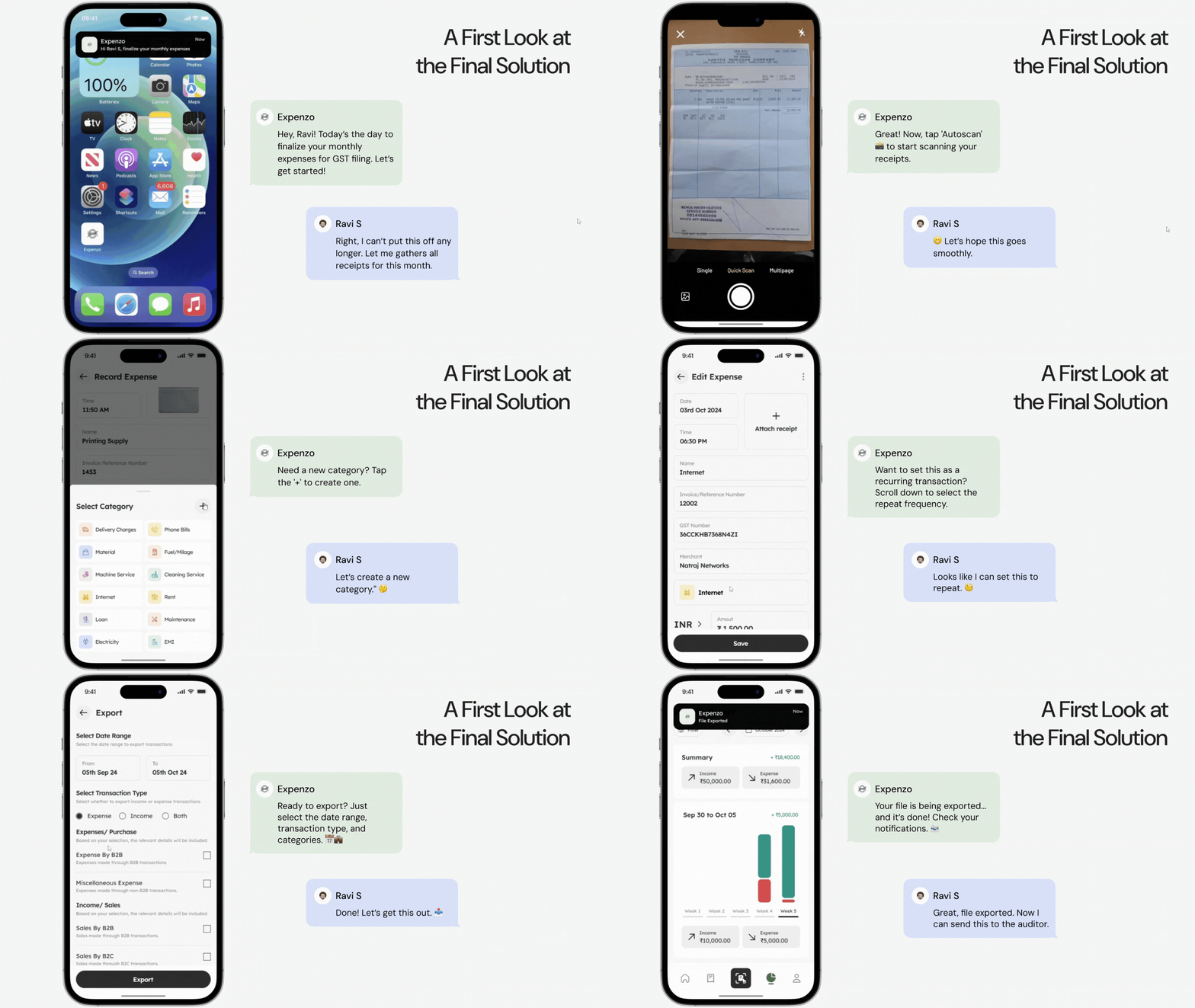
Imagine Ravi, a 47-year-old small business owner who uses Expenzo to manage his expenses efficiently. Running an offset printing business with a team of 10, Ravi relies on Expenzo to streamline his financial management and ensure GST compliance. Let’s see how he records his expenses in the app.
Journey Through Expenzo’s Design: How Every Choice Made Expense Tracking Effortless
What began as a tedious manual entry task is now seamless with Expenzo, making expense management effortless for small business owners. Each feature was crafted to solve real pain points, freeing users to focus on growing their business.
1. What Value Do Summary Cards and Navigation Bring to the Home Screen?
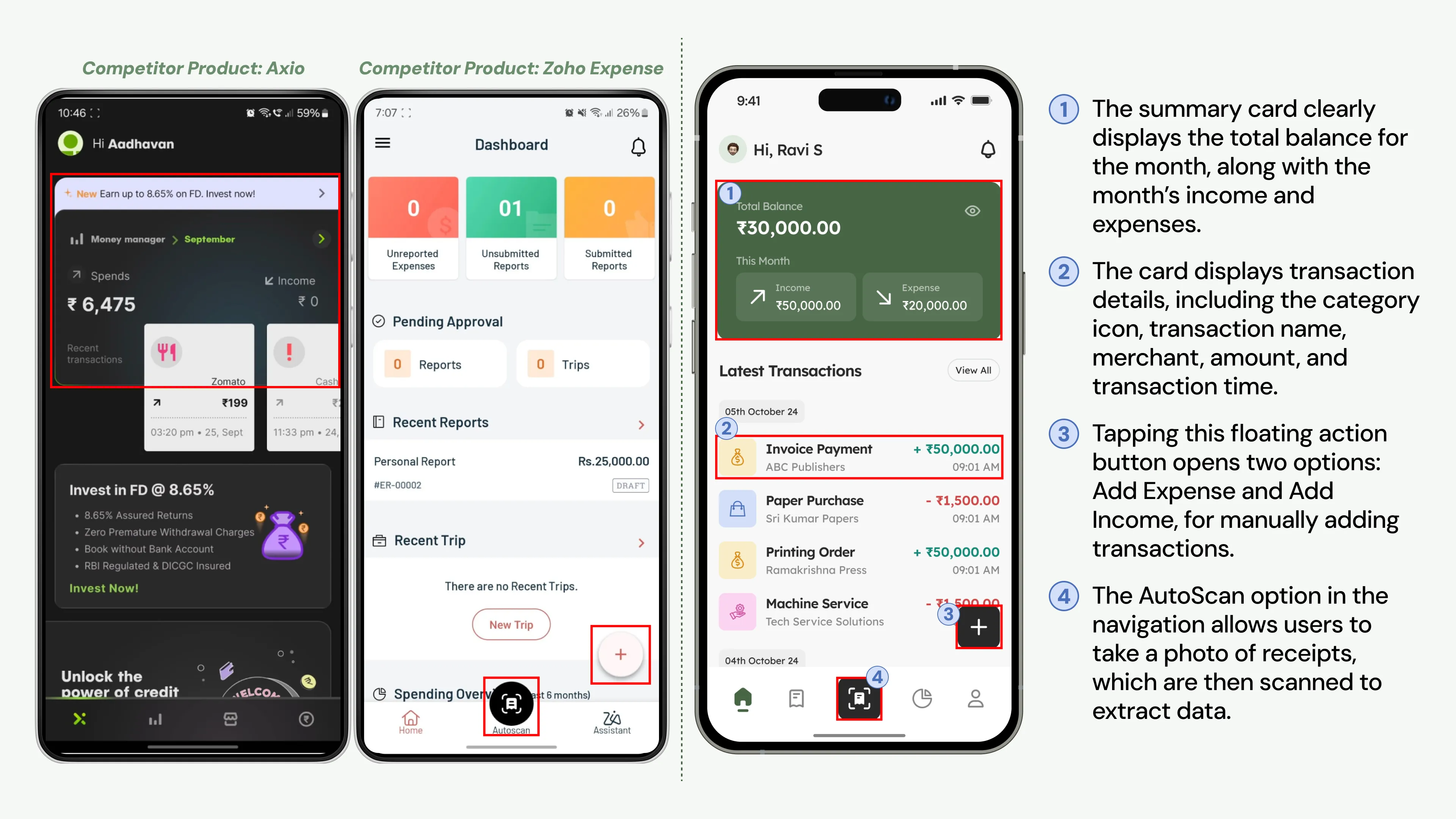
Inspired by successful apps like Axio, I crafted a summary card on Expenzo’s home screen that instantly displays total expenses and income, giving users a snapshot of their finances. Instead of navigating through multiple pages, users can now check their financial status at a glance! Borrowing ideas from Zoho Expense, I integrated features like Autoscan and a floating action button, making navigation feel fluid and natural.
2. Why Flexibility and Accuracy Are Vital in Scanning Receipts?
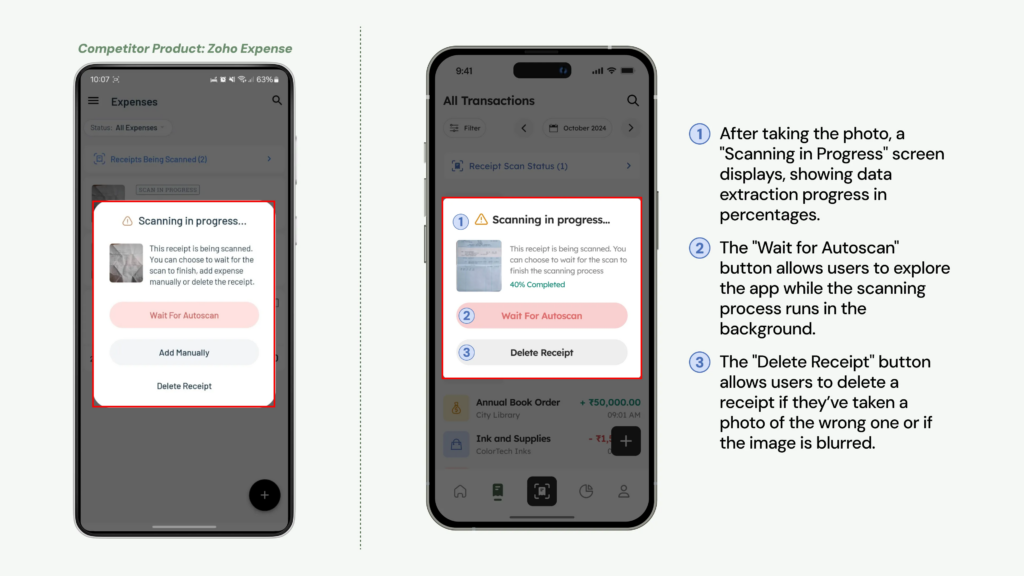
The receipt scanning feature is central to Expenzo, reducing the need for manual entry. Inspired by Zoho Expense, the process includes an overlay with options like “Wait for Autoscan,” “Add Manually,” and “Delete Receipt,” giving users flexibility and control. Expenzo uses Optical Character Recognition (OCR) technology to achieve up to 95% accuracy in data capture; however, image clarity is crucial, as quality issues, especially with cursive handwriting, can reduce accuracy to 75%, emphasizing the need for clear photos.
3. How do Receipt Tracking and Date Filtering Enhance User Experience?
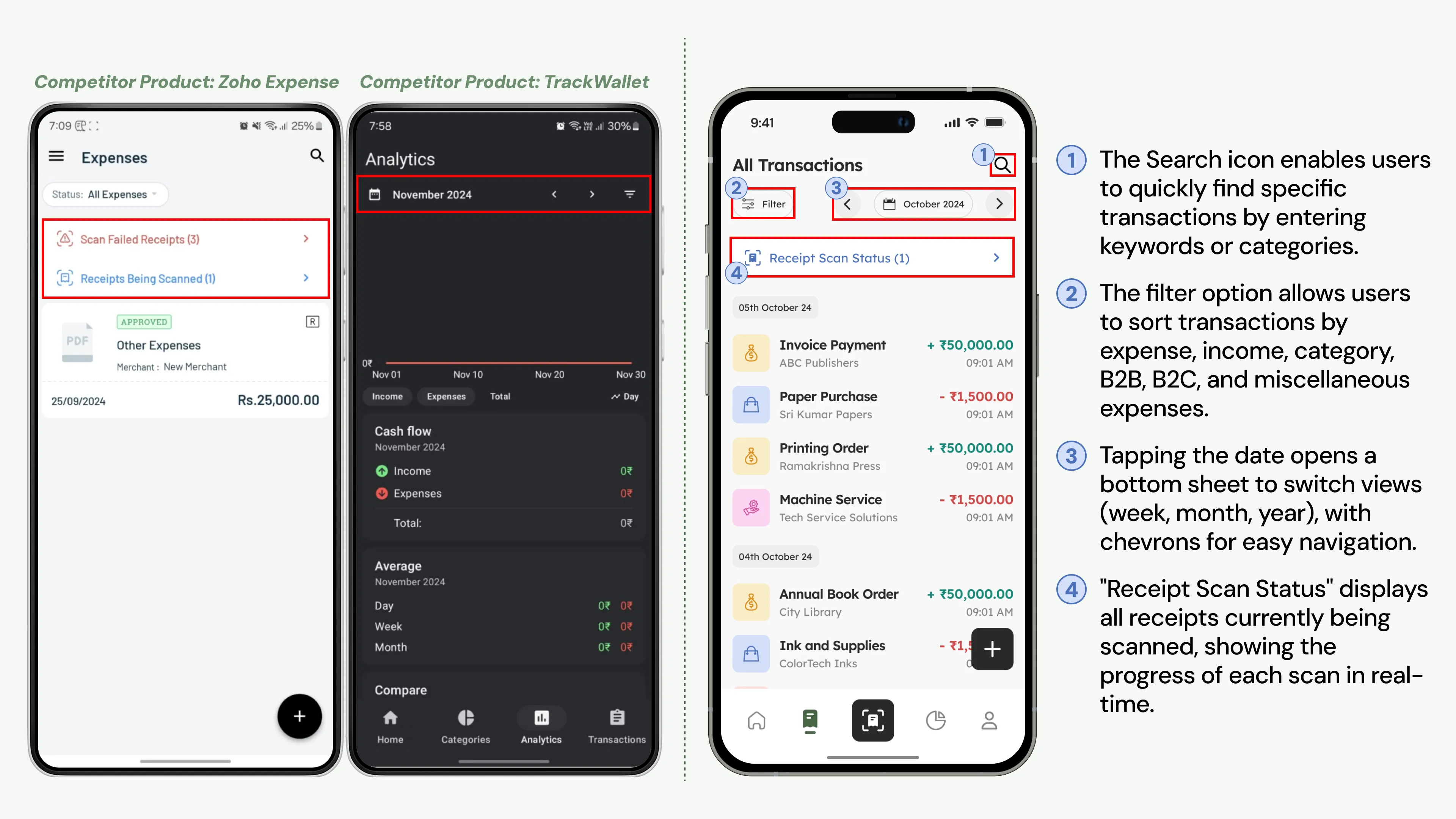
Users can easily track both in-progress and failed receipt scans on the All Transaction Screen, ensuring clarity on recorded receipts. Inspired by TrackWallet’s smart filters, I added filtering and date navigation options, enabling quick retrieval of specific data. This combination of tracking and intuitive navigation keeps the interface efficient, allowing users to access information smoothly without navigating multiple pages, making each interaction purposeful and user-friendly.
4. Why Are Notifications and Standard GST Formats Key to Compliance?
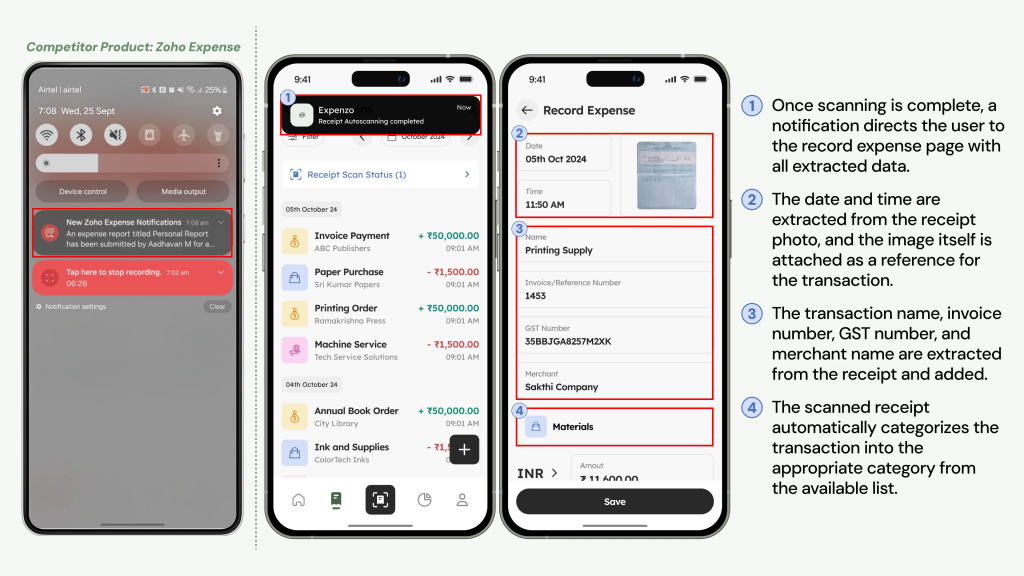
To streamline GST requirements, Expenzo includes notifications that alert users as soon as a scan completes, providing instant feedback. A standardized format with fields like invoice number, date, and GST percentage simplifies record-keeping. The app organizes data automatically for CGST/SGST (intra-state) and IGST (inter-state), ensuring accuracy and compliance. This approach reduces errors and helps users avoid penalties effortlessly.
5. What Makes Customizable Categories Essential for Expense Tracking?
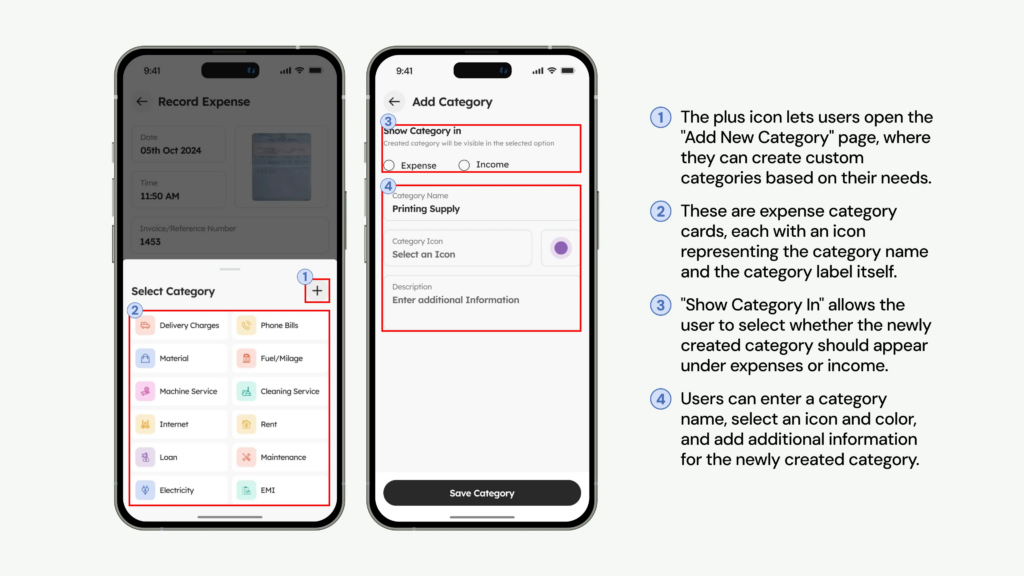
Users shared that customizable categories make the app adaptable to their business needs. Based on feedback, I created customizable expense categories for common items like rent, materials, and fuel. This personalized approach reduces time spent on manual categorization, allowing users to tailor the app to their financial structure while minimizing errors. Expenzo’s automated categorization aligns with users’ unique requirements, making expense tracking both efficient and accurate.
6. How Does the Analytical Page Simplify Financial Insights?
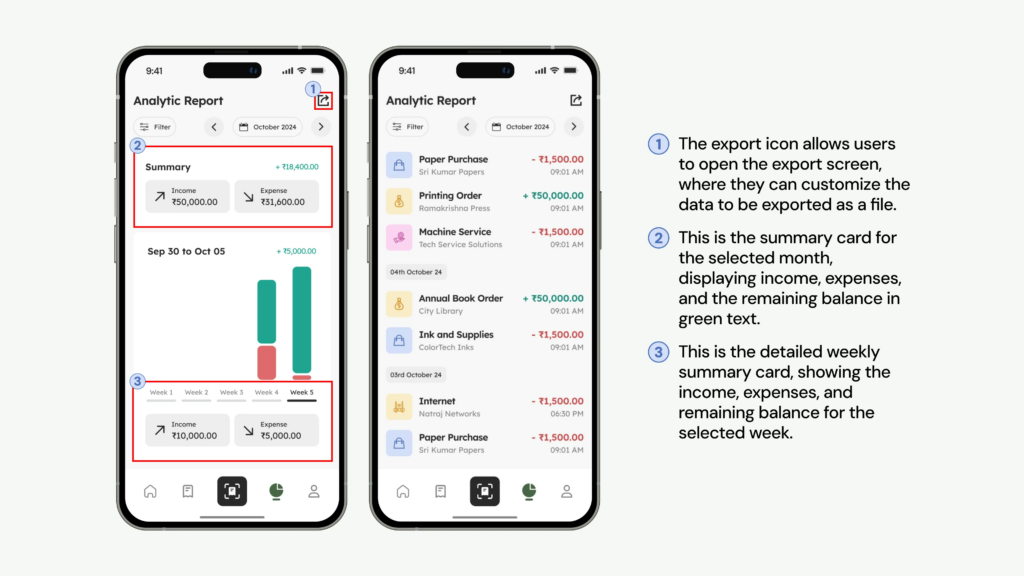
Expenzo’s Analytical Page provides users with clear insights by breaking down income, expenses, and weekly trends. Visual graphs make it easy to identify spending patterns and adjust habits. Customizable filters allow users to focus on specific timeframes or categories, enabling data-driven decisions and boosting financial clarity.
7. What Benefits Do Repeat Transactions Offer for Expense Tracking?
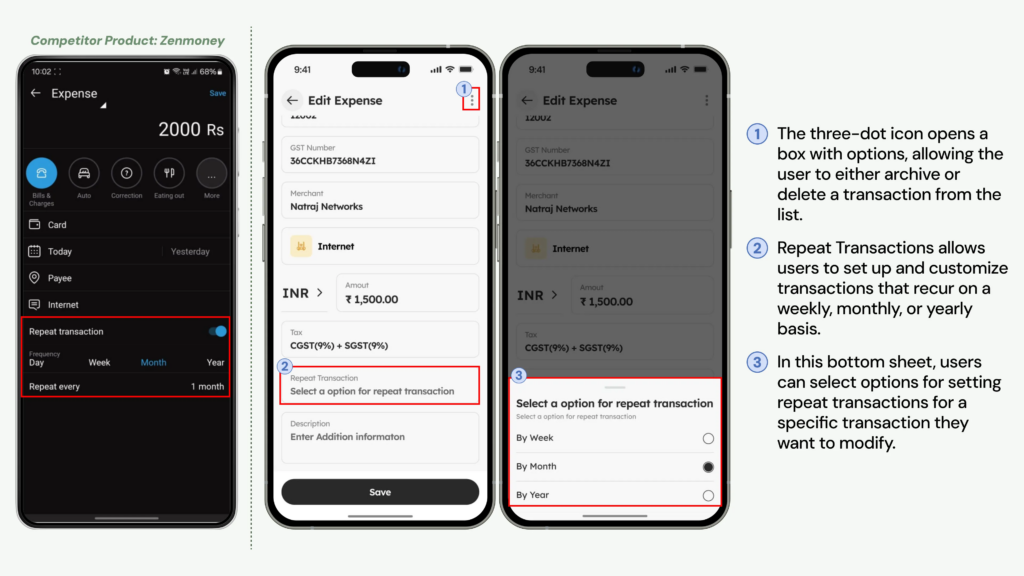
Inspired by Zenmoney, I included a repeat transaction feature that allows users to set recurring entries for weekly, monthly, or yearly expenses, such as rent and utilities. This automation takes the burden off users from re-entering regular expenses, freeing up time and reducing mistakes. Users have found this feature invaluable, as it not only minimizes repetitive tasks but also ensures accuracy and consistency in their financial records, building a reliable picture of ongoing expenses.
8. Why Are Categories and Excel Exports Key for Small Business Finances?
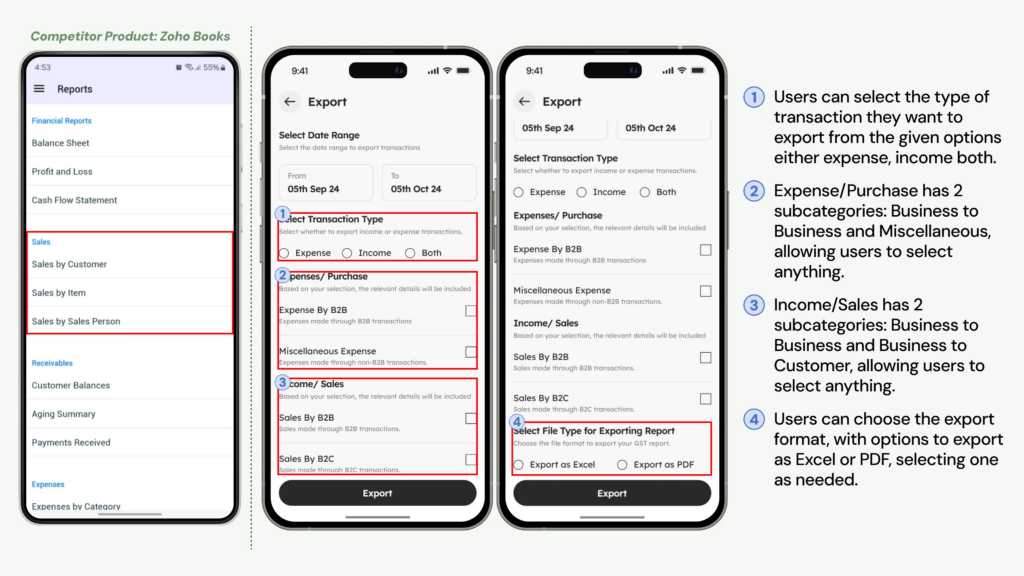
Excel exports remain a favorite among small business owners for easy sharing and record organization. Drawing inspiration from ZohoBooks, I built Expenzo’s export function to filter by categories, expenses, and income, allowing users to organize their data before sharing. With Excel integration, Expenzo offers flexibility and familiarity, making it easy for users to share financial data with accountants, stay organized, and meet GST filing requirements without hassle.
Behind the Scenes of Expenzo: How Key Decisions Shaped a Seamless Expense Tracker
In building Expenzo, key decisions turned initial ideas into a streamlined, user-friendly solution. By refining navigation and adding customizable features, Expenzo simplifies expense tracking, letting small business owners focus on what matters most.
1. How Small Business Owner Insights Shaped Expenzo’s Record Screen?
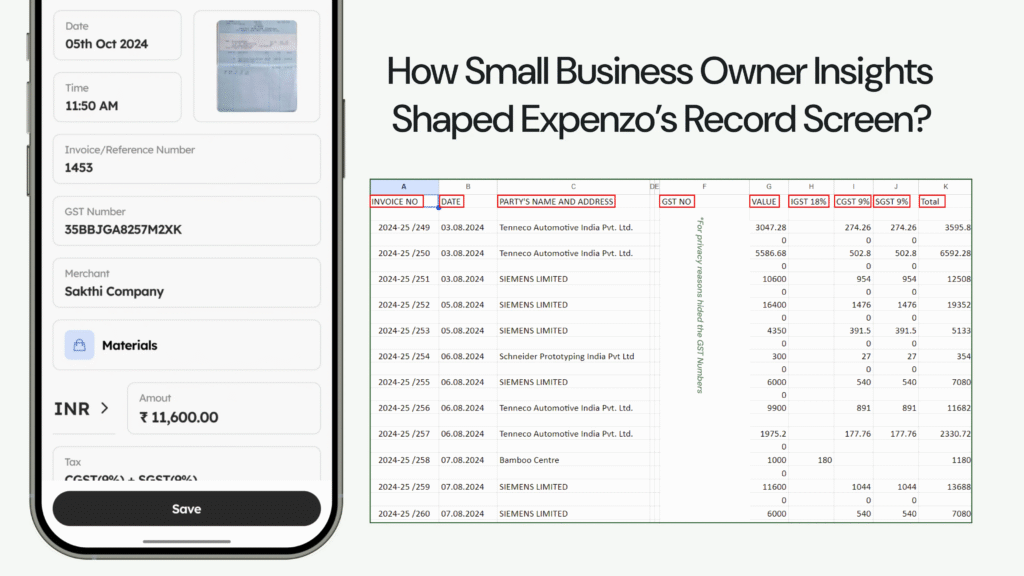
At first, I relied on general research to understand small business expense tracking but found it lacked practical details for a user-friendly design. Seeking real insights, I consulted my father, a small business owner, who shared his Excel sheets with fields like invoice number, date, merchant name, category, amount, and GST percentage. After interviewing five more business owners, I found that four used the same structure. This common format inspired Expenzo’s Record Screen, aligning it with real-world practices to feel intuitive and familiar.
2. Improving Clarity in Bottom Navigation with Distinct Active States
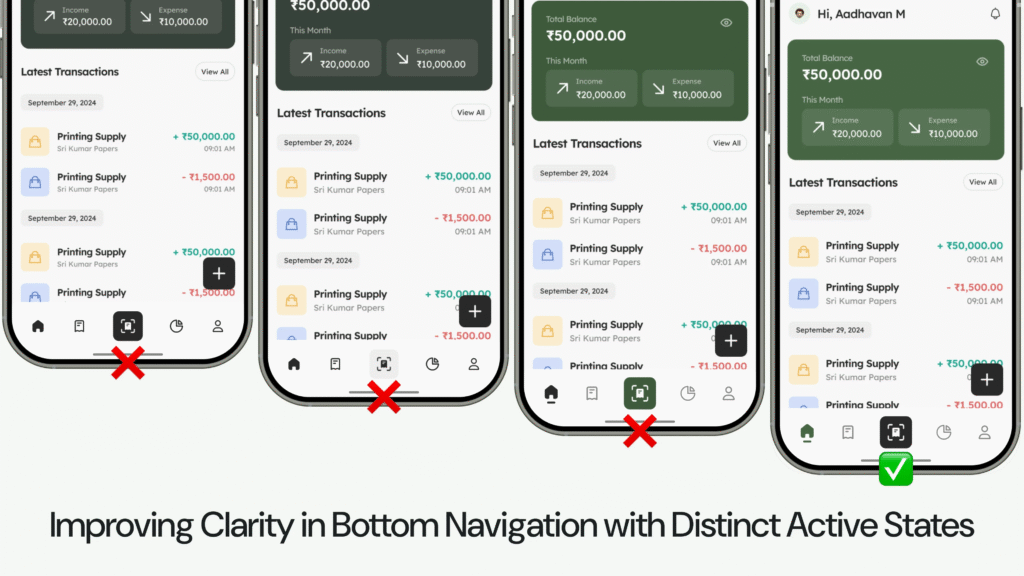
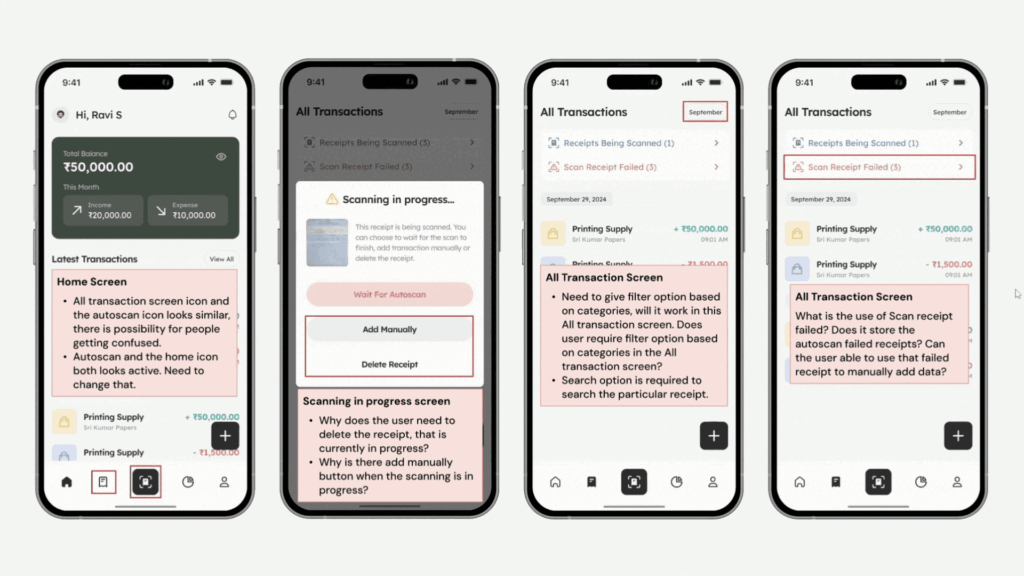
Initially, both the active icon and scan icon in the bottom navigation used the same color, confusing which icon was selected. User feedback revealed this ambiguity, prompting a redesign to enhance clarity. I adjusted the color and visual prominence of the active icon, making it distinct from the scan icon. This change made navigation more intuitive, allowing users to easily identify the active section and improving overall usability.
3. Refining the Scanning in Progress Screen for User Efficiency and Control
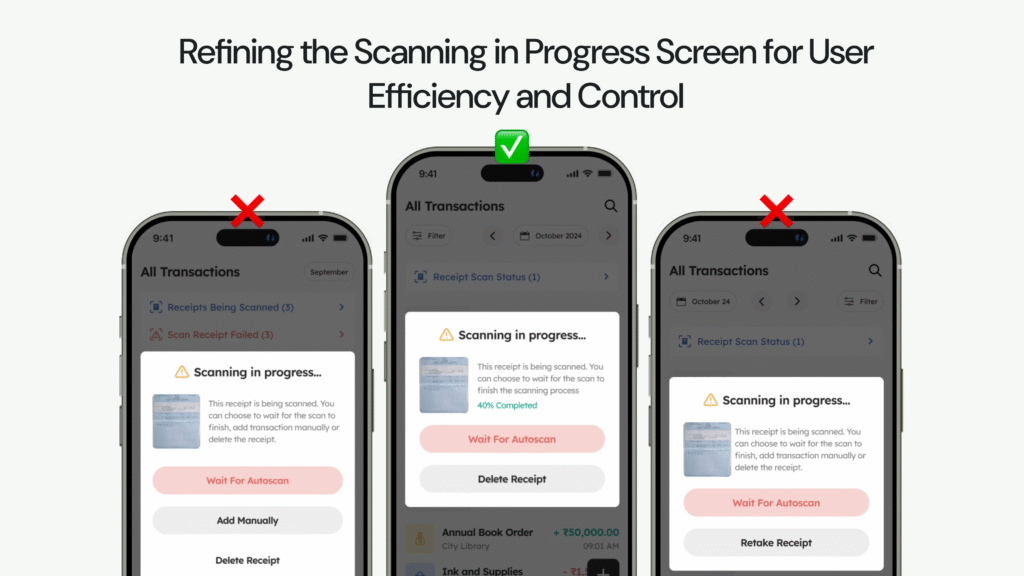
The “Scanning in Progress” screen originally offered Wait for Autoscan, Add Manually, and Delete Receipt options. However, user feedback showed Add Manually was unnecessary, leading to its removal to streamline the interface. I considered changing Delete to Retake Receipt but kept Delete to give users flexibility in managing errors. These adjustments provided a clearer, more user-friendly scanning experience, reducing confusion and enhancing control.
4. Merging Ongoing and Failed Scans into Receipt Scan Status for Clarity
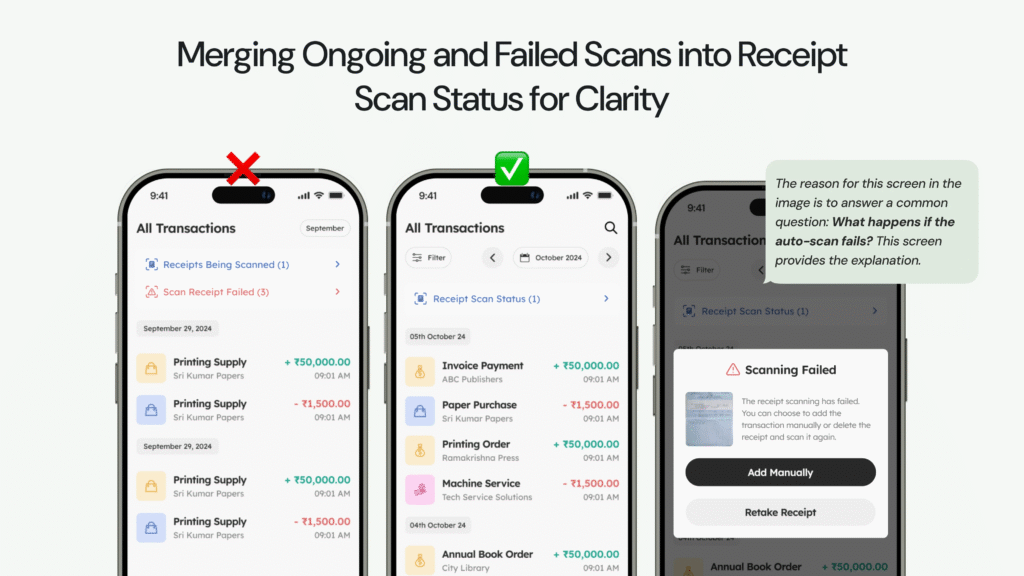
The design had separate statuses for ongoing and failed scans, adding unnecessary complexity. Merging these into a single Receipt Scan Status created a more streamlined interface. Successful scans extract data automatically, while failed scans prompt a pop-up with options to Add Manually or Retake Receipts. This unified approach reduces unnecessary screens, allowing users to address scan issues instantly, enhancing usability and troubleshooting.
5. Expanding Filters and Improving Date Navigation for Better Usability
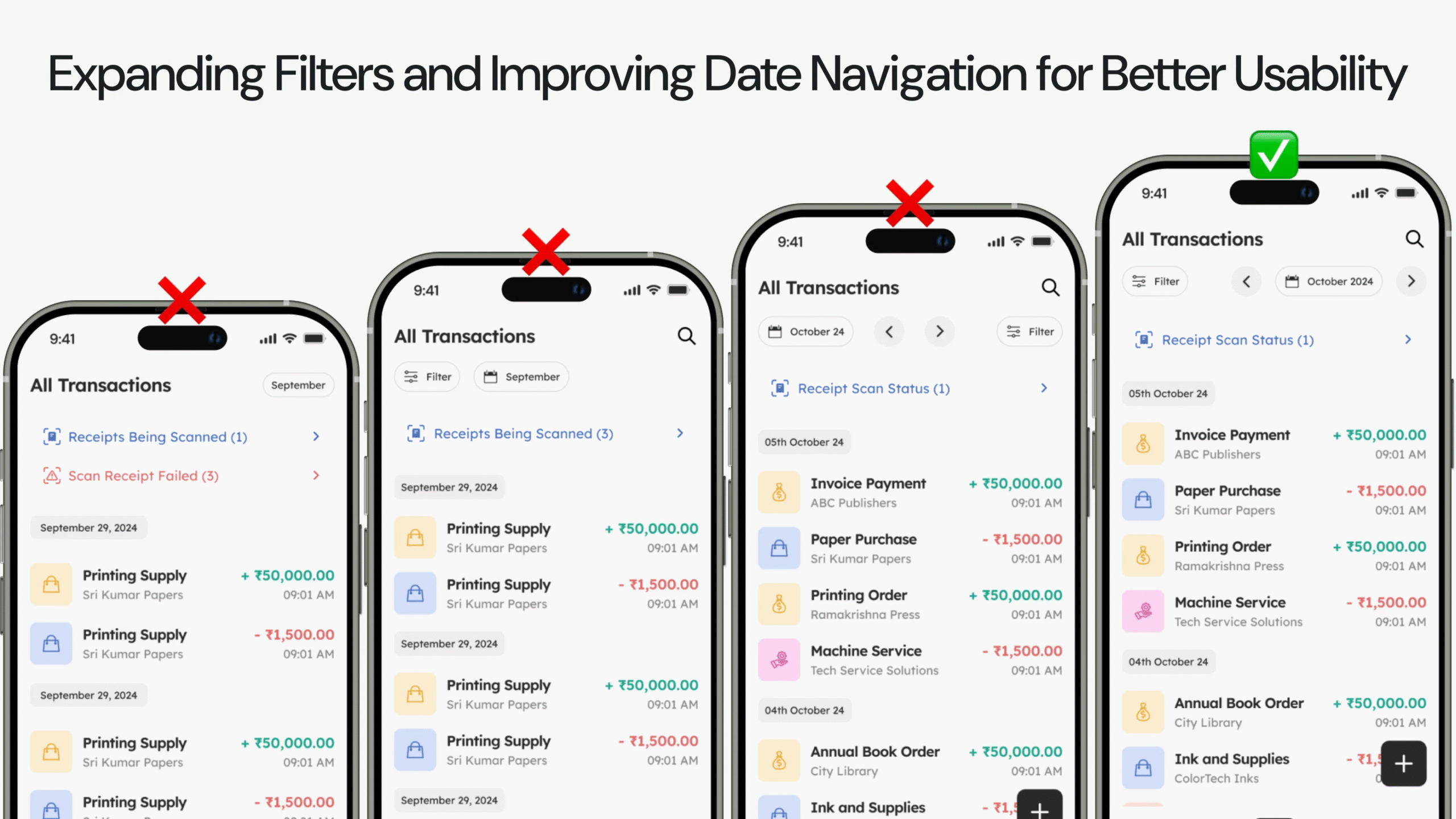
The initial filter design only offered time-based options (week, month, year). Peer reviews and usability testing revealed the need for more filters, so I added categories, expenses, and income filters, increasing user flexibility in data sorting. Date navigation chevrons were moved to the right side for easier thumb reach on larger screens. These changes improved usability, creating a more intuitive and comfortable experience.
6. Enhancing Efficiency by Replacing the Scan Status Screen with Notification
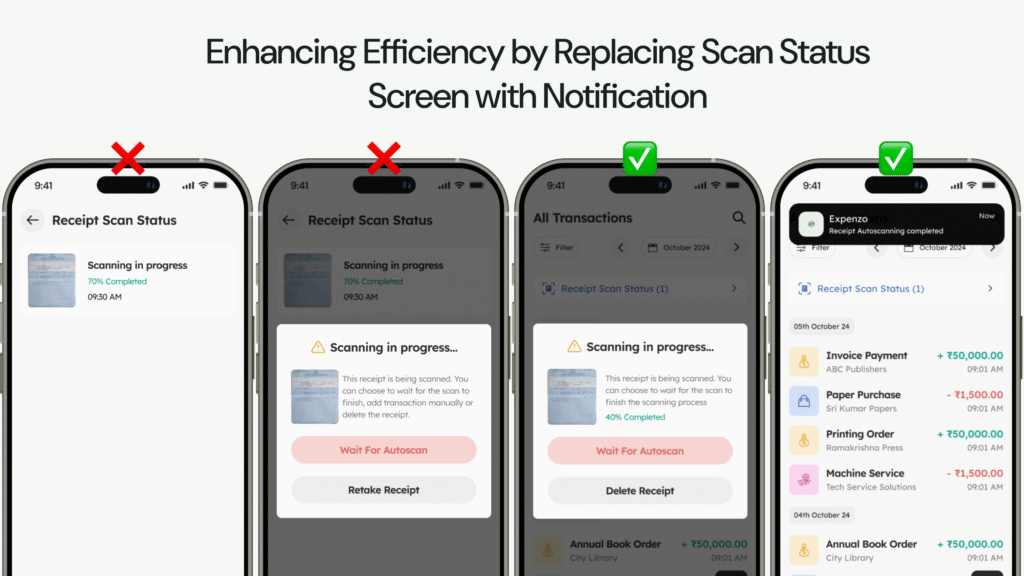
Users had to navigate through multiple pages to check receipt scan status, which usability testing showed was time-consuming for half the users. To simplify, I replaced the Receipt Scan Status page with a notification system. Now, users get an instant notification when a scan completes, leading them directly to the Expense Detail page. This change eliminated unnecessary steps, providing a faster, more intuitive experience that meets user expectations.
7. Tailoring Export Options for Small Business GST Filing Needs and Usability
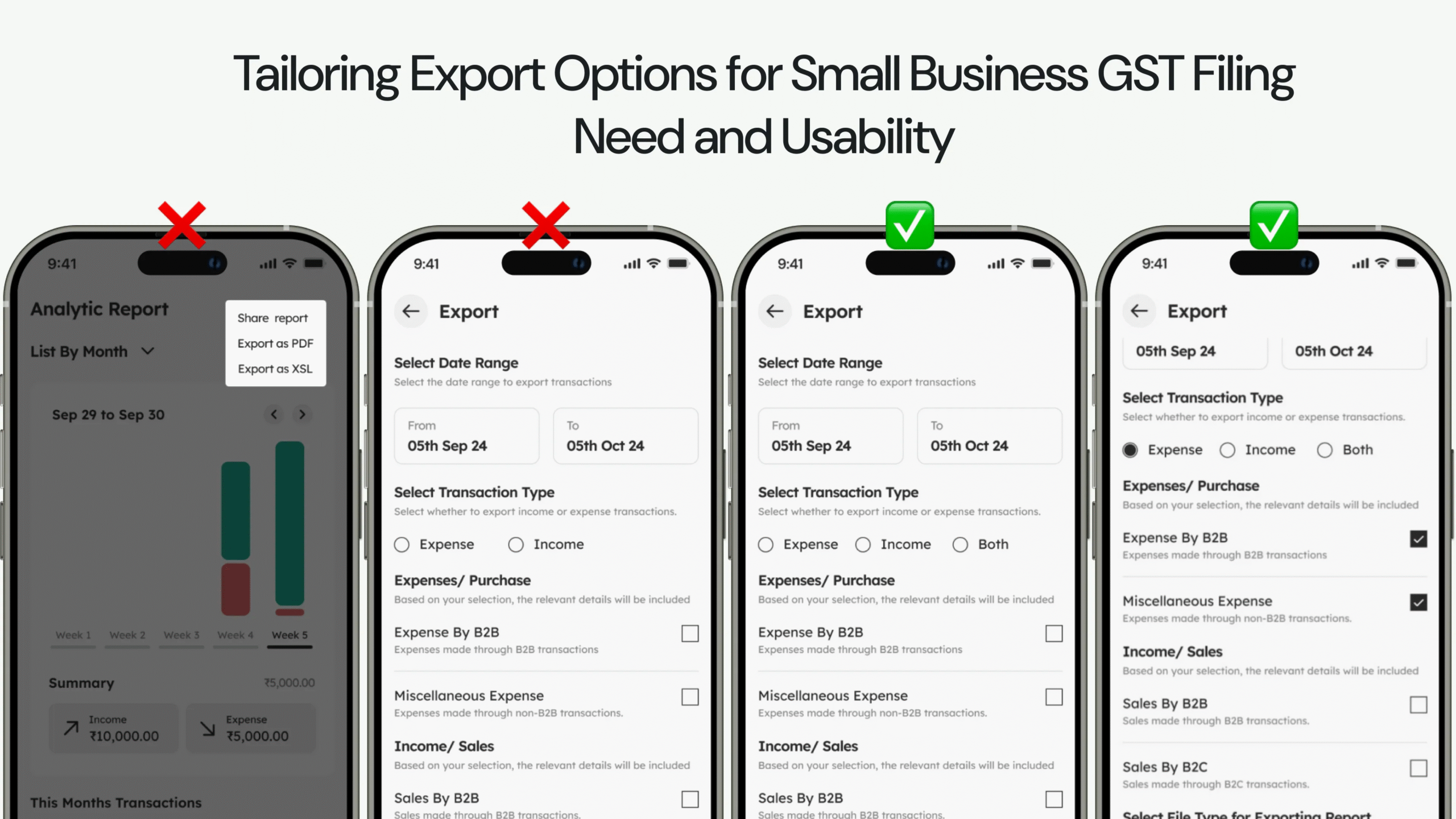
To meet small businesses’ GST filing needs, I introduced flexible export options with date range filters to align with filing deadlines. Usability testing revealed users also needed B2B transaction filters and a total transaction summary before exporting. These additions made report preparation easier, saving time and reducing manual adjustments. The enhanced export functionality met user expectations and regulatory requirements for a streamlined experience.
The Art Behind Crafting Expenzo: Design Skills That Transformed Expense Tracking into a Breeze
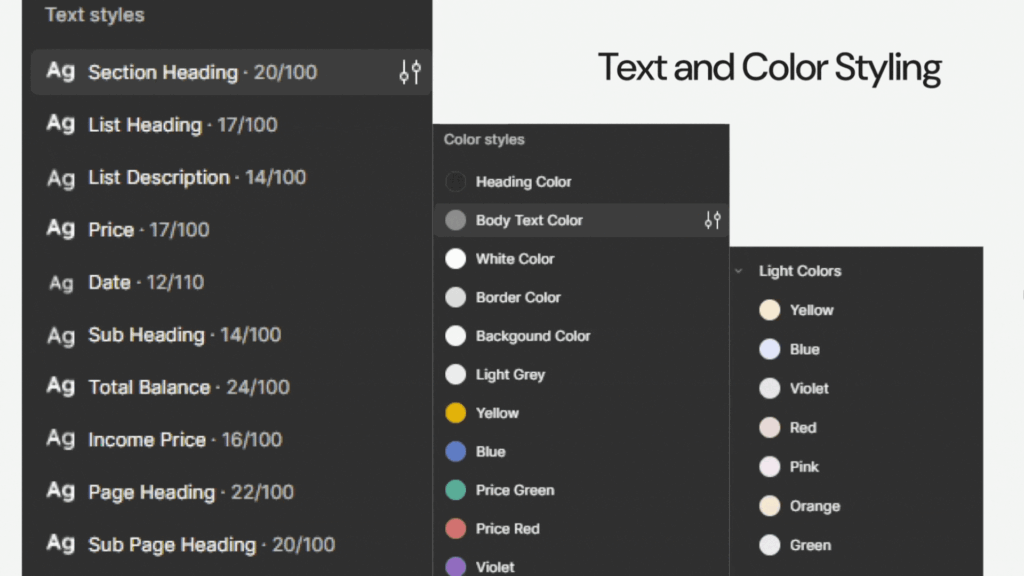
I focused on creating a combined visual language with a structured component system. Text styles were chosen for clear hierarchy and readability, while a thoughtful color palette added harmony and function. Key elements like status bars, expense cards, and buttons were designed for consistency and easy reuse. This approach kept the interface clean and intuitive, making navigation effortless and balancing aesthetics with usability for an engaging user experience.
The Creative Path to Building Expenzo: Every Step Toward Simplifying Expense Tracking
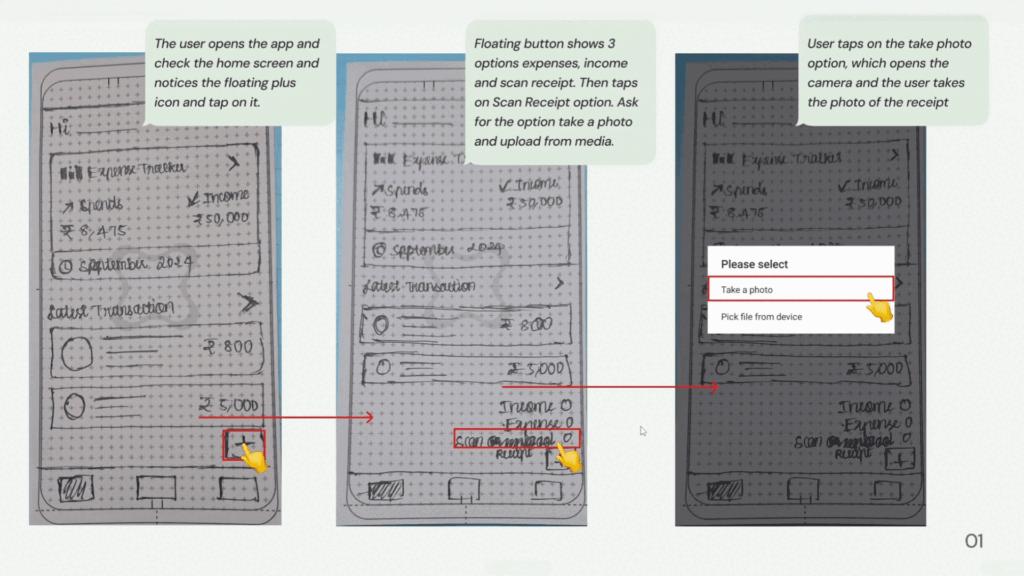
After reviewing 18 potential problems, I chose a project that resonated with me: creating an expense management tool for small business owners. This app lets users scan receipts, categorize expenses, and generate financial reports, simplifying bookkeeping and reducing manual effort. I clarified user pain points and business goals, then explored the fintech landscape through secondary research. Although this led to some ambiguity, I regained focus by forming hypotheses and asking targeted questions, turning uncertainty into new insights for the design.
From Ambiguity to Clarity: Crafting Expenzo for Small Businesses
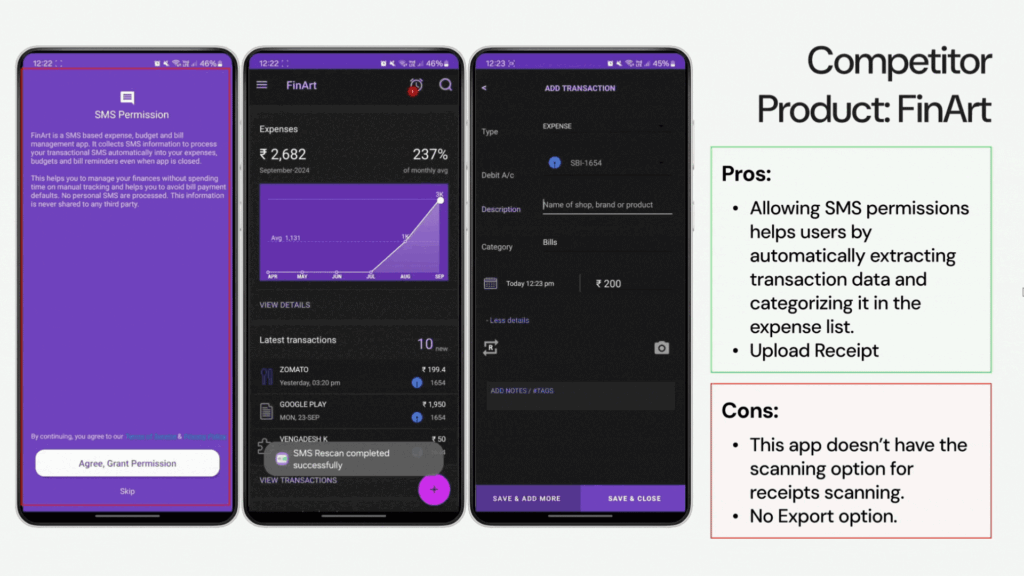
I began with essential questions for designing Expenzo: Should income categories be included? What’s the standard GST format? Research and competitor analysis revealed key fields like GSTIN and invoice details, highlighting gaps in scanning and export features. Practical insights from my father, a small business owner, inspired Expenzo’s Record Screen to meet real user needs.
Refining the Hypothesis: Building a User-Centric Expense Tracker
Guided by user feedback, I refined the initial hypothesis, adding customizable categories, automated receipt scanning, and transaction uploads to enhance usability. I further emphasized automation with features like repeat transactions and auto-categorization to meet user expectations for effortless expense tracking.
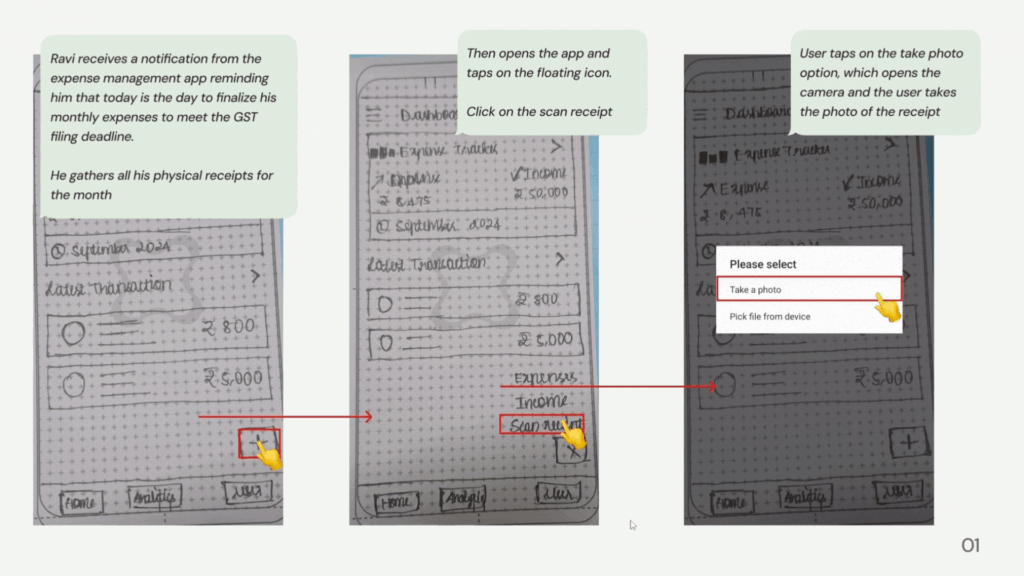
Enhancing Expenzo: Insights from Research and Peer Feedback
Through peer reviews and research, I pinpointed ways to boost user experience and scanning efficiency in Expenzo. Competitor insights from apps like Zoho Expense inspired multitasking during scans. Primary research revealed that small business owners need help with manual tracking, making automated receipt scanning, GST tracking, and integration with tools like Tally essential. These additions created a more streamlined and user-friendly interface for effortless expense management.
Refining Expenzo Through Usability Feedback
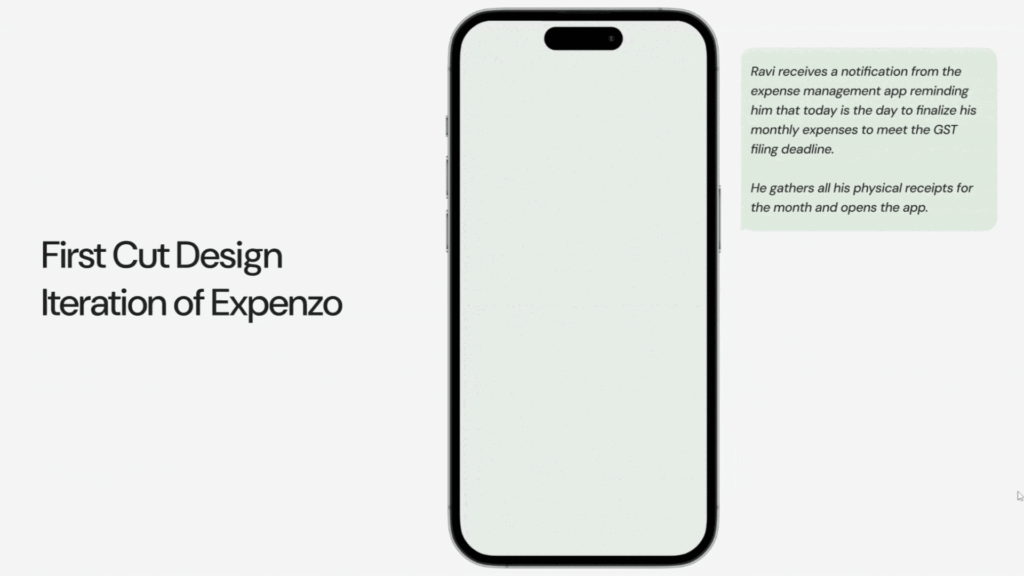
I conducted peer reviews and user testing on the first UI cut, identifying ways to improve the user journey. Feedback from three test users highlighted strengths and areas for improvement. Competitor research provided insights on addressing similar user issues. By analyzing usability feedback and peer input, I refined Expenzo’s interactions and navigation to align with user expectations, enhancing overall usability. This resulted in the final design showcased in the Final Solution section.
Vision for Expenzo’s Future Growth: Unlocking New Possibilities in Expense Tracking
Looking ahead, Expenzo has exciting growth opportunities with features like automated SMS extraction, multi-user access, and offline mode to enhance user experience. These updates support Expenzo’s goal to simplify financial management as users’ businesses expand.
1. Streamlining GST Filings with Excel Copy-and-Paste Integration
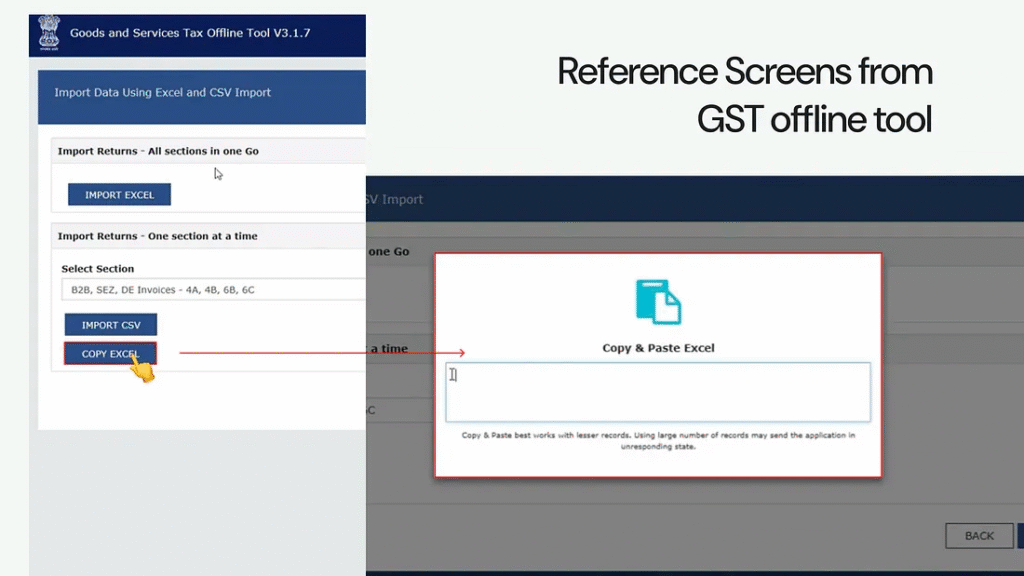
Integrating a copy-and-paste feature for Excel data into a GST tool can greatly improve efficiency for users who rely on spreadsheets. This feature saves time by removing repetitive data entry and reduces human error, leading to more accurate GST filings. Additionally, tools like GSTZen make reporting easy by allowing users to upload sales invoices directly from Excel, ensuring both compliance and consistency with regulatory requirements.
2. Automatic Transaction Tracking Through Bank SMS Notifications
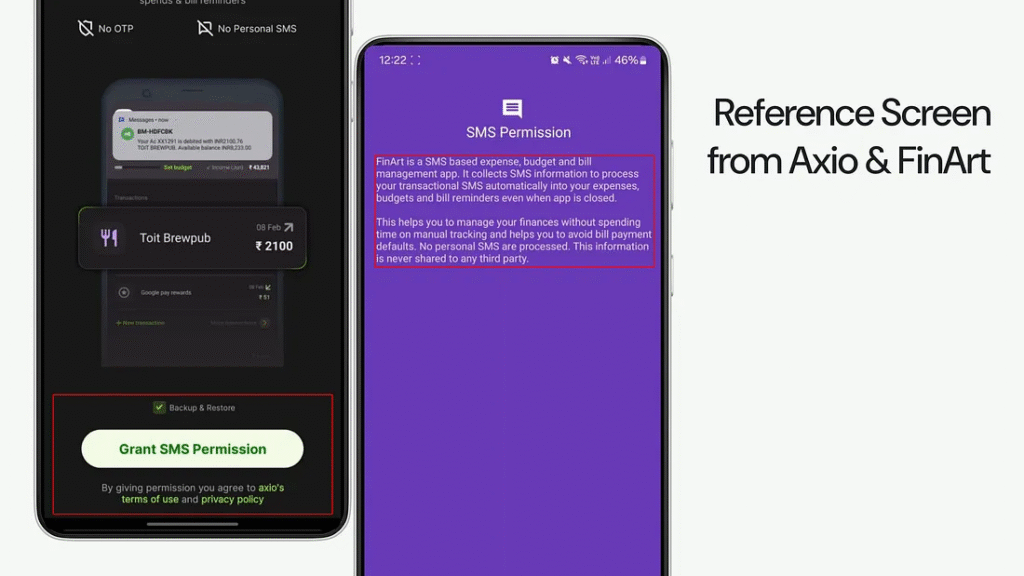
Imagine receiving a bank SMS and knowing Expenzo will automatically capture and categorize the transaction — no manual entry needed. With automated SMS extraction, Expenzo pulls financial data directly from bank notifications on debits, credits, and other transactions. This feature removes the hassle of manual expense entry, letting users focus on their business. Each SMS seamlessly updates financial records, ensuring accuracy and making expense management smoother and stress-free.
3. Empowering Teams with Secure Multi-User Access for Expense Tracking
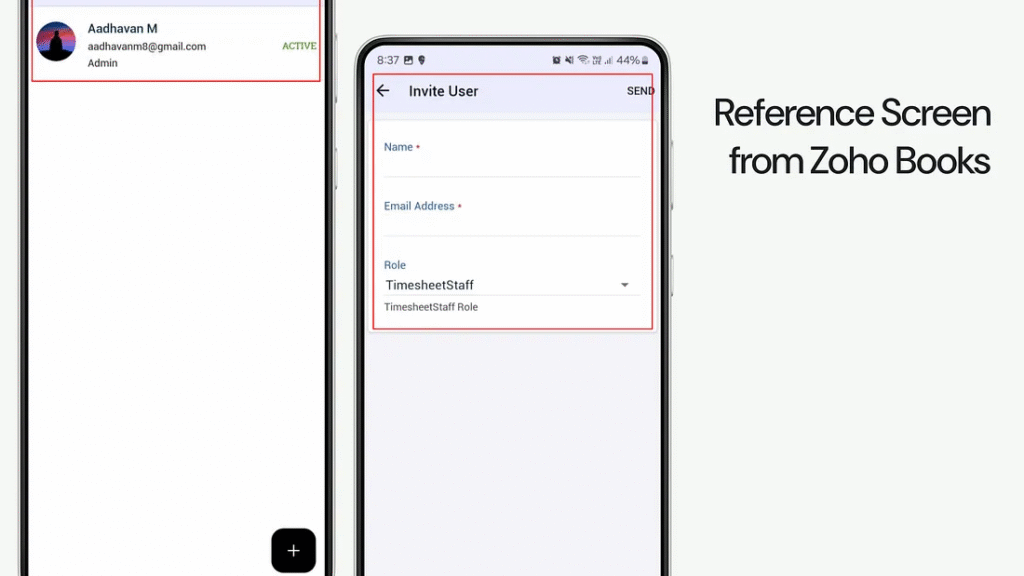
Imagine a business owner who can delegate expense tracking to their team while keeping sensitive financial data secure. With multi-user access and custom permission levels, Expenzo lets owners assign tasks like data entry and receipt uploads to employees, ensuring collaboration without compromising privacy. Owners retain full oversight, streamlining financial management by improving team efficiency and keeping data safe and organized.
4. Effortless Bookkeeping with Automated Receipt and Ledger Sync
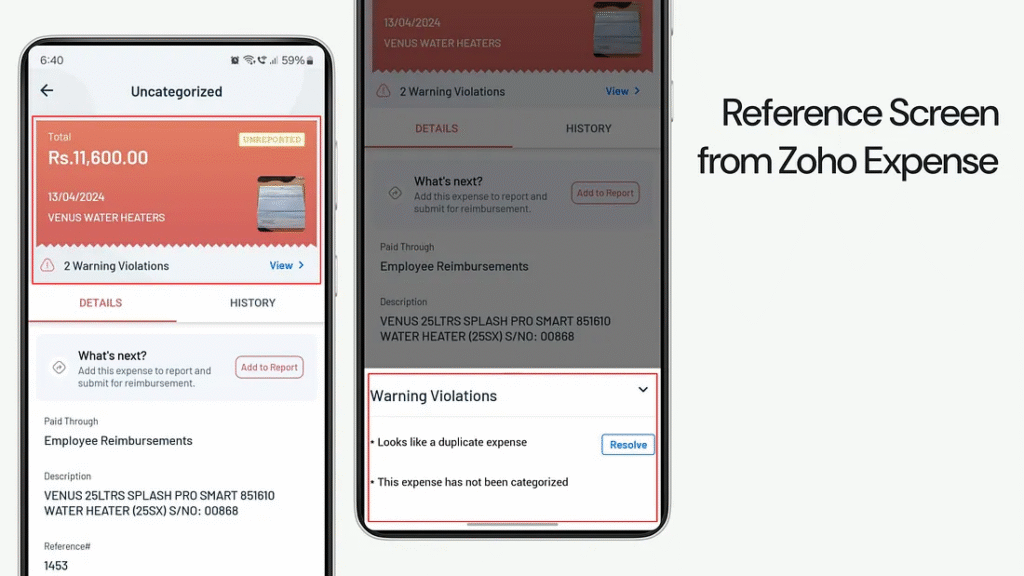
Imagine a business owner who uploads a receipt, and Expenzo instantly matches it with the right ledger entry — no manual work required. This automated sync feature compares uploaded receipts to existing records, spotting discrepancies and ensuring accurate financial data. By streamlining bookkeeping, it saves time, allowing owners to focus on growth. With seamless receipt-to-ledger integration, Expenzo simplifies expense management and keeps every transaction in check.
5. Reliable Expense Tracking Anytime with Offline Mode
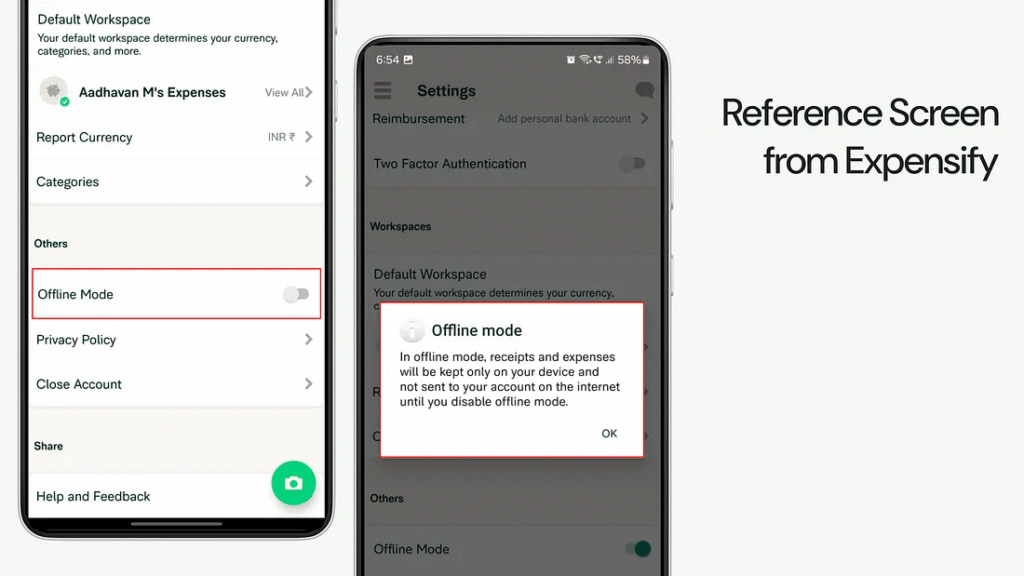
Imagine a business owner on the go, working in remote areas with limited internet, needing seamless expense tracking. With Expenzo’s Offline Mode, users can manage expenses without a connection, ensuring uninterrupted workflow. When reconnected, offline data syncs automatically, filling any gaps in financial records. Ideal for frequent travelers or those in low-connectivity zones, this feature keeps users productive and organized, making expense management accessible anytime, anywhere.
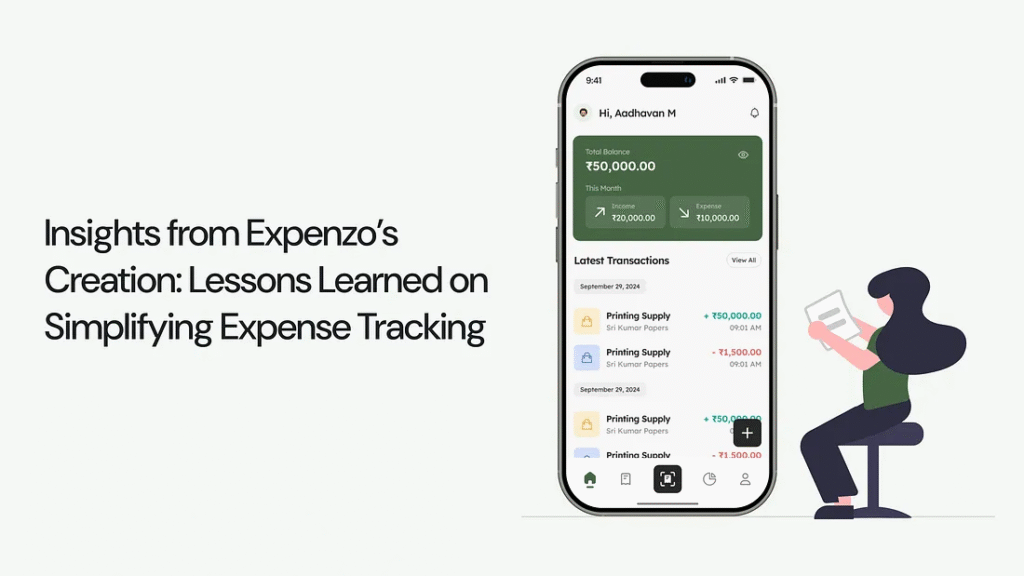
Insights from Expenzo’s Creation: Lessons Learned on Simplifying Expense Tracking
Designing Expenzo taught me the value of user feedback and empathy in design, balancing aesthetics with functionality for a truly user-focused solution. This journey strengthened my skills and deepened my understanding of creating solutions that genuinely support users’ needs.
Learnings: I realized the importance of focusing on the 80% of problems that impact users most, rather than trying to solve every minor issue. By prioritizing key challenges, I streamlined development efforts and delivered solutions that made a meaningful difference to users.
Learnings: I learned that embracing ambiguity can lead to deeper insights, helping me clarify the core issues. Facing uncertainty encouraged me to ask questions and collaborate, which ultimately revealed overlooked solutions and enhanced problem-solving.
Learnings: I discovered that collaboration through peer reviews and open discussions uncovers valuable insights and ideas. Sharing challenges with others led to refined solutions and strengthened the overall project quality.
Learnings: I found that adapting based on user feedback led to a more refined design and better user satisfaction. Iterating regularly allowed me to stay aligned with users’ needs, improving the solution progressively and achieving more effective outcomes.
Learnings: I learned that engaging in user research from the beginning provides a solid foundation for design decisions. Conducting interviews and observations early on allowed me to understand genuine user needs and challenges, leading to solutions that are more aligned with their expectations and daily routines. Early insights helped shape a more relevant and user-centered product, reducing the need for major revisions later in the process.
Shaping Expenzo Together: Your Feedback Makes a Difference
I’m excited to present Expenzo and would be grateful for any feedback to further improve the project. Your thoughts will be instrumental in refining the solution to make it truly user-centered.
Thank you so much for your time and thoughts! If you liked the project or have suggestions, connect with me via DM on social media ❤ — LinkedIn
Expenzo: Tackling the Pain of Manual Expense Tracking for Small Businesses — A UX Case Study
Tired of spending hours manually tracking your expenses instead of focusing on your business?
For many small business owners, managing expenses can feel like a full-time job. Hours are spent organizing receipts, entering data into spreadsheets, and trying to stay on top of finances — time that could be used to grow their businesses. This manual process not only eats up valuable time but also increases the risk of errors, missed entries, and financial disorganization.
To tackle this, I designed Expenzo, a tool to take the stress out of expense management and make it as seamless as possible.
Solution Overview: Expenzo to the Rescue!
Expenzo automates receipt scanning, categorizes expenses, and helps keep track of every detail, so nothing falls through the cracks. The result? Business owners spend less time on bookkeeping and more time focusing on what they do best — running their businesses.
The goal?
Join me as I share how Expenzo came to life, through research, design, and countless iterations to build an expense management tool that meets small business needs.
I understand time constraints, so here’s a video for a quick overview.
A First Look at the Final Solution: Simplifying Expense Tracking for Small Businesses
Imagine Ravi, a 47-year-old small business owner who uses Expenzo to manage his expenses efficiently. Running an offset printing business with a team of 10, Ravi relies on Expenzo to streamline his financial management and ensure GST compliance. Let’s see how he records his expenses in the app.
Journey Through Expenzo’s Design: How Every Choice Made Expense Tracking Effortless
What began as a tedious manual entry task is now seamless with Expenzo, making expense management effortless for small business owners. Each feature was crafted to solve real pain points, freeing users to focus on growing their business.
1. What Value Do Summary Cards and Navigation Bring to the Home Screen?
Inspired by successful apps like Axio, I crafted a summary card on Expenzo’s home screen that instantly displays total expenses and income, giving users a snapshot of their finances. Instead of navigating through multiple pages, users can now check their financial status at a glance! Borrowing ideas from Zoho Expense, I integrated features like Autoscan and a floating action button, making navigation feel fluid and natural.
2. Why Flexibility and Accuracy Are Vital in Scanning Receipts?
The receipt scanning feature is central to Expenzo, reducing the need for manual entry. Inspired by Zoho Expense, the process includes an overlay with options like “Wait for Autoscan,” “Add Manually,” and “Delete Receipt,” giving users flexibility and control. Expenzo uses Optical Character Recognition (OCR) technology to achieve up to 95% accuracy in data capture; however, image clarity is crucial, as quality issues, especially with cursive handwriting, can reduce accuracy to 75%, emphasizing the need for clear photos.
3. How do Receipt Tracking and Date Filtering Enhance User Experience?
Users can easily track both in-progress and failed receipt scans on the All Transaction Screen, ensuring clarity on recorded receipts. Inspired by TrackWallet’s smart filters, I added filtering and date navigation options, enabling quick retrieval of specific data. This combination of tracking and intuitive navigation keeps the interface efficient, allowing users to access information smoothly without navigating multiple pages, making each interaction purposeful and user-friendly.
4. Why Are Notifications and Standard GST Formats Key to Compliance?
To streamline GST requirements, Expenzo includes notifications that alert users as soon as a scan completes, providing instant feedback. A standardized format with fields like invoice number, date, and GST percentage simplifies record-keeping. The app organizes data automatically for CGST/SGST (intra-state) and IGST (inter-state), ensuring accuracy and compliance. This approach reduces errors and helps users avoid penalties effortlessly.
5. What Makes Customizable Categories Essential for Expense Tracking?
Users shared that customizable categories make the app adaptable to their business needs. Based on feedback, I created customizable expense categories for common items like rent, materials, and fuel. This personalized approach reduces time spent on manual categorization, allowing users to tailor the app to their financial structure while minimizing errors. Expenzo’s automated categorization aligns with users’ unique requirements, making expense tracking both efficient and accurate.
6. How Does the Analytical Page Simplify Financial Insights?
Expenzo’s Analytical Page provides users with clear insights by breaking down income, expenses, and weekly trends. Visual graphs make it easy to identify spending patterns and adjust habits. Customizable filters allow users to focus on specific timeframes or categories, enabling data-driven decisions and boosting financial clarity.
7. What Benefits Do Repeat Transactions Offer for Expense Tracking?
Inspired by Zenmoney, I included a repeat transaction feature that allows users to set recurring entries for weekly, monthly, or yearly expenses, such as rent and utilities. This automation takes the burden off users from re-entering regular expenses, freeing up time and reducing mistakes. Users have found this feature invaluable, as it not only minimizes repetitive tasks but also ensures accuracy and consistency in their financial records, building a reliable picture of ongoing expenses.
8. Why Are Categories and Excel Exports Key for Small Business Finances?
Excel exports remain a favorite among small business owners for easy sharing and record organization. Drawing inspiration from ZohoBooks, I built Expenzo’s export function to filter by categories, expenses, and income, allowing users to organize their data before sharing. With Excel integration, Expenzo offers flexibility and familiarity, making it easy for users to share financial data with accountants, stay organized, and meet GST filing requirements without hassle.
Behind the Scenes of Expenzo: How Key Decisions Shaped a Seamless Expense Tracker
In building Expenzo, key decisions turned initial ideas into a streamlined, user-friendly solution. By refining navigation and adding customizable features, Expenzo simplifies expense tracking, letting small business owners focus on what matters most.
1. How Small Business Owner Insights Shaped Expenzo’s Record Screen?
At first, I relied on general research to understand small business expense tracking but found it lacked practical details for a user-friendly design. Seeking real insights, I consulted my father, a small business owner, who shared his Excel sheets with fields like invoice number, date, merchant name, category, amount, and GST percentage. After interviewing five more business owners, I found that four used the same structure. This common format inspired Expenzo’s Record Screen, aligning it with real-world practices to feel intuitive and familiar.
2. Improving Clarity in Bottom Navigation with Distinct Active States
Initially, both the active icon and scan icon in the bottom navigation used the same color, confusing which icon was selected. User feedback revealed this ambiguity, prompting a redesign to enhance clarity. I adjusted the color and visual prominence of the active icon, making it distinct from the scan icon. This change made navigation more intuitive, allowing users to easily identify the active section and improving overall usability.
3. Refining the Scanning in Progress Screen for User Efficiency and Control
The “Scanning in Progress” screen originally offered Wait for Autoscan, Add Manually, and Delete Receipt options. However, user feedback showed Add Manually was unnecessary, leading to its removal to streamline the interface. I considered changing Delete to Retake Receipt but kept Delete to give users flexibility in managing errors. These adjustments provided a clearer, more user-friendly scanning experience, reducing confusion and enhancing control.
4. Merging Ongoing and Failed Scans into Receipt Scan Status for Clarity
The design had separate statuses for ongoing and failed scans, adding unnecessary complexity. Merging these into a single Receipt Scan Status created a more streamlined interface. Successful scans extract data automatically, while failed scans prompt a pop-up with options to Add Manually or Retake Receipts. This unified approach reduces unnecessary screens, allowing users to address scan issues instantly, enhancing usability and troubleshooting.
5. Expanding Filters and Improving Date Navigation for Better Usability
The initial filter design only offered time-based options (week, month, year). Peer reviews and usability testing revealed the need for more filters, so I added categories, expenses, and income filters, increasing user flexibility in data sorting. Date navigation chevrons were moved to the right side for easier thumb reach on larger screens. These changes improved usability, creating a more intuitive and comfortable experience.
6. Enhancing Efficiency by Replacing the Scan Status Screen with Notification
Users had to navigate through multiple pages to check receipt scan status, which usability testing showed was time-consuming for half the users. To simplify, I replaced the Receipt Scan Status page with a notification system. Now, users get an instant notification when a scan completes, leading them directly to the Expense Detail page. This change eliminated unnecessary steps, providing a faster, more intuitive experience that meets user expectations.
7. Tailoring Export Options for Small Business GST Filing Needs and Usability
To meet small businesses’ GST filing needs, I introduced flexible export options with date range filters to align with filing deadlines. Usability testing revealed users also needed B2B transaction filters and a total transaction summary before exporting. These additions made report preparation easier, saving time and reducing manual adjustments. The enhanced export functionality met user expectations and regulatory requirements for a streamlined experience.
The Art Behind Crafting Expenzo: Design Skills That Transformed Expense Tracking into a Breeze
I focused on creating a combined visual language with a structured component system. Text styles were chosen for clear hierarchy and readability, while a thoughtful color palette added harmony and function. Key elements like status bars, expense cards, and buttons were designed for consistency and easy reuse. This approach kept the interface clean and intuitive, making navigation effortless and balancing aesthetics with usability for an engaging user experience.
The Creative Path to Building Expenzo: Every Step Toward Simplifying Expense Tracking
After reviewing 18 potential problems, I chose a project that resonated with me: creating an expense management tool for small business owners. This app lets users scan receipts, categorize expenses, and generate financial reports, simplifying bookkeeping and reducing manual effort. I clarified user pain points and business goals, then explored the fintech landscape through secondary research. Although this led to some ambiguity, I regained focus by forming hypotheses and asking targeted questions, turning uncertainty into new insights for the design.
From Ambiguity to Clarity: Crafting Expenzo for Small Businesses
I began with essential questions for designing Expenzo: Should income categories be included? What’s the standard GST format? Research and competitor analysis revealed key fields like GSTIN and invoice details, highlighting gaps in scanning and export features. Practical insights from my father, a small business owner, inspired Expenzo’s Record Screen to meet real user needs.
Refining the Hypothesis: Building a User-Centric Expense Tracker
Guided by user feedback, I refined the initial hypothesis, adding customizable categories, automated receipt scanning, and transaction uploads to enhance usability. I further emphasized automation with features like repeat transactions and auto-categorization to meet user expectations for effortless expense tracking.
Enhancing Expenzo: Insights from Research and Peer Feedback
Through peer reviews and research, I pinpointed ways to boost user experience and scanning efficiency in Expenzo. Competitor insights from apps like Zoho Expense inspired multitasking during scans. Primary research revealed that small business owners need help with manual tracking, making automated receipt scanning, GST tracking, and integration with tools like Tally essential. These additions created a more streamlined and user-friendly interface for effortless expense management.
Refining Expenzo Through Usability Feedback
I conducted peer reviews and user testing on the first UI cut, identifying ways to improve the user journey. Feedback from three test users highlighted strengths and areas for improvement. Competitor research provided insights on addressing similar user issues. By analyzing usability feedback and peer input, I refined Expenzo’s interactions and navigation to align with user expectations, enhancing overall usability. This resulted in the final design showcased in the Final Solution section.
Vision for Expenzo’s Future Growth: Unlocking New Possibilities in Expense Tracking
Looking ahead, Expenzo has exciting growth opportunities with features like automated SMS extraction, multi-user access, and offline mode to enhance user experience. These updates support Expenzo’s goal to simplify financial management as users’ businesses expand.
1. Streamlining GST Filings with Excel Copy-and-Paste Integration
Integrating a copy-and-paste feature for Excel data into a GST tool can greatly improve efficiency for users who rely on spreadsheets. This feature saves time by removing repetitive data entry and reduces human error, leading to more accurate GST filings. Additionally, tools like GSTZen make reporting easy by allowing users to upload sales invoices directly from Excel, ensuring both compliance and consistency with regulatory requirements.
2. Automatic Transaction Tracking Through Bank SMS Notifications
Imagine receiving a bank SMS and knowing Expenzo will automatically capture and categorize the transaction — no manual entry needed. With automated SMS extraction, Expenzo pulls financial data directly from bank notifications on debits, credits, and other transactions. This feature removes the hassle of manual expense entry, letting users focus on their business. Each SMS seamlessly updates financial records, ensuring accuracy and making expense management smoother and stress-free.
3. Empowering Teams with Secure Multi-User Access for Expense Tracking
Imagine a business owner who can delegate expense tracking to their team while keeping sensitive financial data secure. With multi-user access and custom permission levels, Expenzo lets owners assign tasks like data entry and receipt uploads to employees, ensuring collaboration without compromising privacy. Owners retain full oversight, streamlining financial management by improving team efficiency and keeping data safe and organized.
4. Effortless Bookkeeping with Automated Receipt and Ledger Sync
Imagine a business owner who uploads a receipt, and Expenzo instantly matches it with the right ledger entry — no manual work required. This automated sync feature compares uploaded receipts to existing records, spotting discrepancies and ensuring accurate financial data. By streamlining bookkeeping, it saves time, allowing owners to focus on growth. With seamless receipt-to-ledger integration, Expenzo simplifies expense management and keeps every transaction in check.
5. Reliable Expense Tracking Anytime with Offline Mode
Imagine a business owner on the go, working in remote areas with limited internet, needing seamless expense tracking. With Expenzo’s Offline Mode, users can manage expenses without a connection, ensuring uninterrupted workflow. When reconnected, offline data syncs automatically, filling any gaps in financial records. Ideal for frequent travelers or those in low-connectivity zones, this feature keeps users productive and organized, making expense management accessible anytime, anywhere.
Insights from Expenzo’s Creation: Lessons Learned on Simplifying Expense Tracking
Designing Expenzo taught me the value of user feedback and empathy in design, balancing aesthetics with functionality for a truly user-focused solution. This journey strengthened my skills and deepened my understanding of creating solutions that genuinely support users’ needs.
Learnings: I realized the importance of focusing on the 80% of problems that impact users most, rather than trying to solve every minor issue. By prioritizing key challenges, I streamlined development efforts and delivered solutions that made a meaningful difference to users.
Learnings: I learned that embracing ambiguity can lead to deeper insights, helping me clarify the core issues. Facing uncertainty encouraged me to ask questions and collaborate, which ultimately revealed overlooked solutions and enhanced problem-solving.
Learnings: I discovered that collaboration through peer reviews and open discussions uncovers valuable insights and ideas. Sharing challenges with others led to refined solutions and strengthened the overall project quality.
Learnings: I found that adapting based on user feedback led to a more refined design and better user satisfaction. Iterating regularly allowed me to stay aligned with users’ needs, improving the solution progressively and achieving more effective outcomes.
Learnings: I learned that engaging in user research from the beginning provides a solid foundation for design decisions. Conducting interviews and observations early on allowed me to understand genuine user needs and challenges, leading to solutions that are more aligned with their expectations and daily routines. Early insights helped shape a more relevant and user-centered product, reducing the need for major revisions later in the process.
Shaping Expenzo Together: Your Feedback Makes a Difference
I’m excited to present Expenzo and would be grateful for any feedback to further improve the project. Your thoughts will be instrumental in refining the solution to make it truly user-centered.
Thank you so much for your time and thoughts! If you liked the project or have suggestions, connect with me via DM on social media ❤ — LinkedIn